
 New Arrivals
 Offers
 Service & Repair

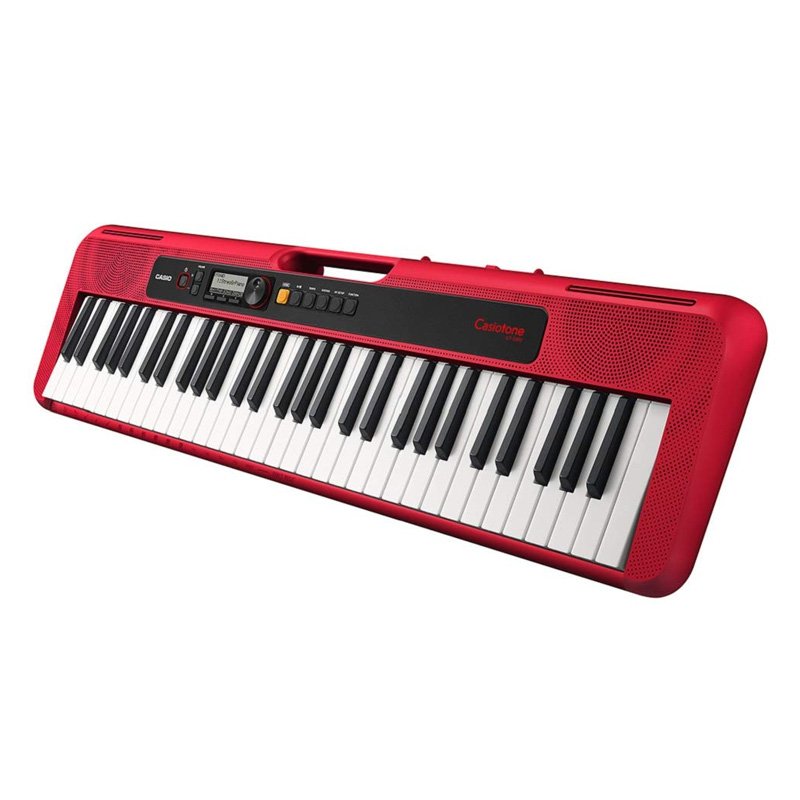
Casio Ct S200 Casiotone Keyboard
SKU: Casio CT-S200 Casiotone Keyboard
Out of stock
With the CT-S200 you can enjoy music whenever and wherever you like. Its compact size of 930 mm x 256 mm x 73 mm is 30% smaller in volume than the CTK-2500 and CTK-2550 models, and it boasts roughly 16 hours of alkaline battery life*. With a grip at the top of the keyboard and a weight of only 3.3 kg, it couldn’t be easier to carry. The design incorporates rounded edges and corners, making it safely portable.
Out of stock
1. **Powering On**: Locate the power switch on the keyboard, typically located on the rear panel or near the power adapter input. Flip the switch to the “On” position to power on the keyboard.
2. **Selecting a Sound**: Use the “Tone” button or the selector knob to choose a sound. The Casio CT-S200 offers a variety of instrument sounds such as piano, organ, strings, and more. Scroll through the available tones until you find the one you want to use.
3. **Adjusting Volume**: Use the “Volume” knob to adjust the overall volume level of the keyboard. Start with a low volume setting and gradually increase it to a comfortable level.
4. **Playing Rhythms**: Explore the built-in rhythms by pressing the “Rhythm” button or selector knob. The Casio CT-S200 offers a range of accompaniment styles such as pop, rock, jazz, and more. Select a rhythm and adjust the tempo using the tempo buttons or knob.
5. **Playing Songs**: The Casio CT-S200 comes with built-in songs that you can play along with. Press the “Song Bank” button or selector knob to access the song bank. Use the buttons or knob to select a song, then press “Start/Stop” to begin playback. You can play along with the song using the keyboard’s keys.
| Weight | 1 kg |
|---|
Brand
CASIO
Based on 0 reviews
Be the first to review “Casio Ct S200 Casiotone Keyboard”
Related products
-
Microphones, Music
Boya By Wm8 Pro K2 Uhf Dual Channel Wireless Microphone
*Ideal for interviews, ENG/EFP,film production *compander for high quality and clear sound *dual channel wireless receiver *48 UHF channels * more than 6 hours continuous operation * operation range cn rech upto 100m (wihout obstacle) * automatic LCD locked function *easy to read LCD disply
SKU: BOYA BY WM8 PRO K2 UHF DUAL CHANNEL WIRELESS MICROPHONE

There are no reviews yet.