1. **Plug in the Charger**:
– Locate a power outlet or socket near your charging area.
– Insert the charger’s prongs firmly into the outlet until it’s securely in place.
2. **Connect the Cable**:
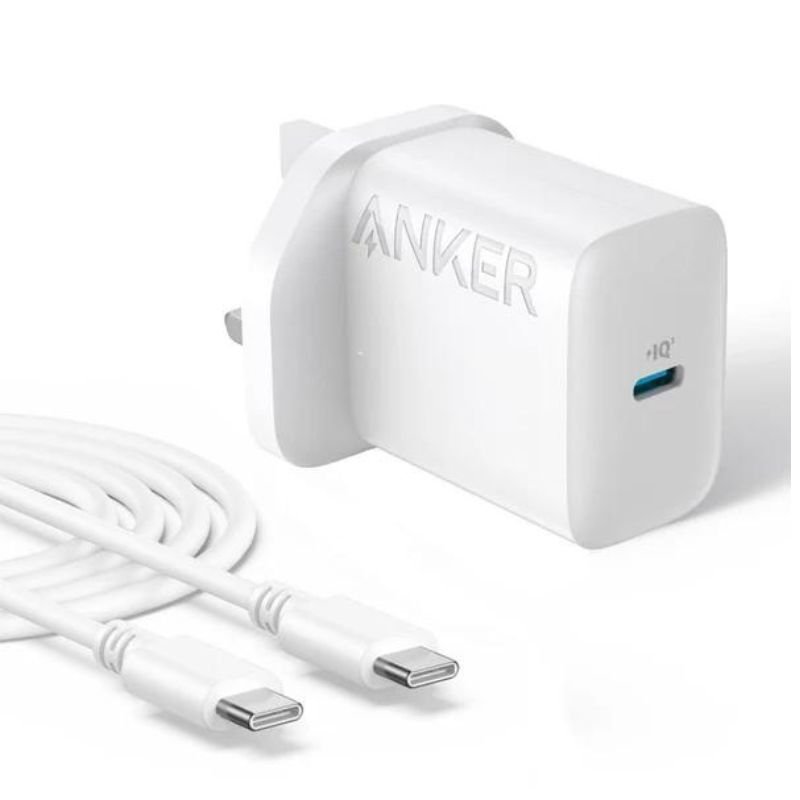
– Identify the USB-C port on the charger.
– Plug one end of the provided 1.5-meter cable into this port.
3. **Connect to Your Device**:
– Plug the other end of the cable into your device’s USB-C port. Ensure a secure connection.
4. **Power On**:
– Once connected, the charger will automatically start supplying power.
– Your device should indicate that it’s charging. If your device supports fast charging, it will charge at the maximum supported rate provided by the charger.
5. **Charging Complete and Disconnect**:
– When your device is fully charged or you no longer need to charge, unplug the charging cable from your device first.
– Then, unplug the adapter from the power outlet or socket and store it safely for future use.
Candc DC C9 Cardioid Microphone
Yasmina Mini Smart Portable Bluetooth Speaker Black
Sony PS5 Dual Sense Wireless Controller - Starlight Blue
ADJUSTABLE ONE PIECE WAIST BAND TW 32093
Ipega Gladiator Game Joystick For Smart Phone Pg-9135
Dtech Dt Hd002 Hdmi To Dvi 1.5M Cable
Cleo-TY Mini Tabletop Football Game
GH1001 RED MAGIC Game Handle
New Arrivals
Offers
Service & Repair


There are no reviews yet.