
-
×
 ANKER NEBULA MARS 2PRO D2323211 PORTABLE PROJECTOR
1 × 199.800 OMR
-
×
 MAX BMS 135 BOOM MIC STAND
3 × 9.500 OMR
-
×
 CLEO PLASTIC RECORDER
1 × 0.700 OMR
-
×
 ميلوديكا ميلوديكا النحلة Bm 13k
1 × 5.900 OMR
-
×
 3713 ج موسيقى جيتار 3713 ج
1 × 3.800 OMR
-
×
 BOYA WIRELESS MICROPHONE BY WM4 PRO
1 × 47.900 OMR
-
×
 AHUJA UTP30 WIRED TIE CLIP MIC
1 × 10.000 OMR
-
×
 YH 31 PS4 2 in 1 Charging Heat Sink
1 × 11.900 OMR
-
×
 MAX DH 821 Wireless Microphone
1 × 22.000 OMR
-
×
 ثلاجة كلي أوسب
2 × 5.900 OMR
-
×
 BBurago Metal Car Ferrari 499P Size 1.18
1 × 42.900 OMR
-
×
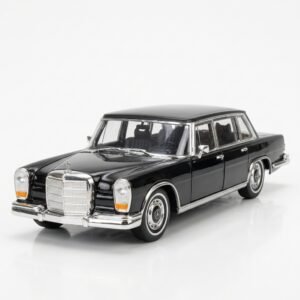 Welly Metal Car Mercedes Benz 600 Size 1.24 WL-24121W
1 × 12.900 OMR
-
×
 TOSHIBA 2xAA 2000mah RECHARGEABLE BATTERY with USB CHARGER
1 × 3.800 OMR
-
×
 DigitPlus DP-C090 PD100W USB-C to USB-C DATA CABLE
1 × 3.500 OMR
-
×
 4 IN 1 MOBILE GAME COMBO PACK
1 × 8.900 OMR
-
×
 TP-Link MR200 AC750 Dual Band Wi-Fi 4G LTE Router
1 × 23.900 OMR
-
×
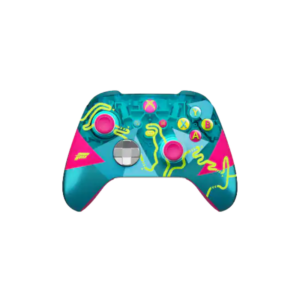 وحدة تحكم Xbox لاسلكية - إصدار Forza Horizon 6 المحدود
1 × 32.900 OMR
المجموع: 471.100 OMR
 أقل سعر
 الخدمة والإصلاح


 أحدث
لا توجد مراجعات حتى الآن.