
-
×
 فيلم زجاجي لعدسة كاميرا آي فون 11 برو المعدني من USAMS
1 × 1.900 OMR
فيلم زجاجي لعدسة كاميرا آي فون 11 برو المعدني من USAMS
1 × 1.900 OMR
المجموع: 1.900 OMR
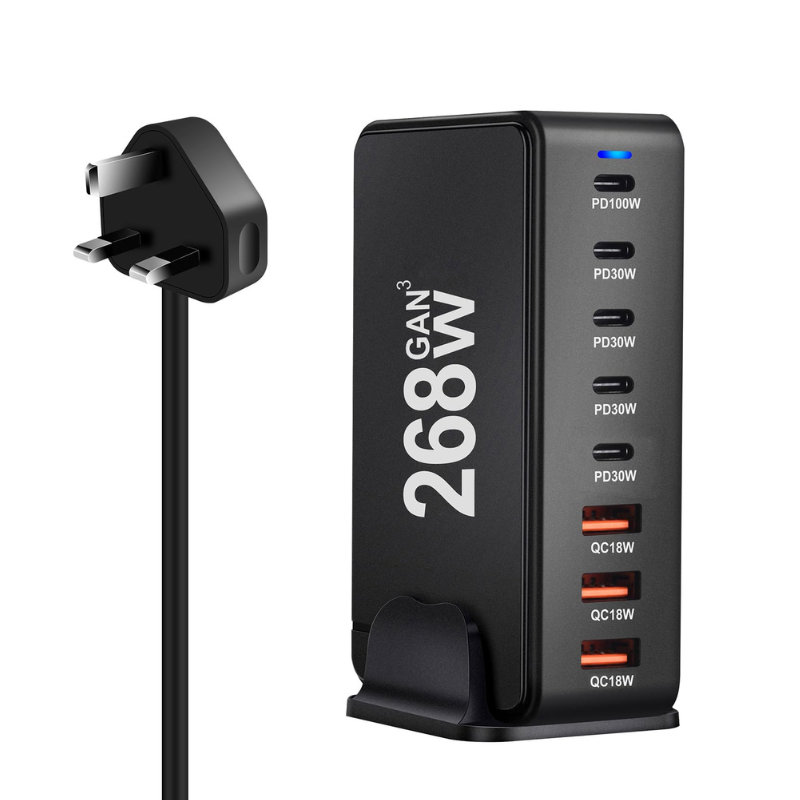
SKU: DigitPlus DP-868 GaN Pro 268W (3USB-A / 4USB-C)
متوفر في المخزون
The DigitPlus DP-868 GaN Pro 268W 7-Port Fast Charger is a cutting-edge charging solution designed for modern devices. Utilizing Gallium Nitride (GaN) technology, it delivers up to 268W of power through its 3 USB-A ports and 4 USB-C ports. This allows simultaneous charging of multiple devices at high speeds, making it ideal for tech enthusiasts, professionals, and households needing efficient and rapid charging capabilities.
12.900 OMR
متوفر في المخزون
1. **Plug in the Charger**: Connect the power cord of the DigitPlus DP-868 GaN Pro 268W charger to a suitable power outlet.
2. **Identify Charging Ports**: Locate the 3 USB-A ports and 4 USB-C ports on the charger. These ports are designed to accommodate different types of devices simultaneously.
3. **Connect Devices**: Plug your devices into the USB-A or USB-C ports using their respective cables. Ensure the cables are securely connected for efficient charging.
4. **Power On**: Once all devices are connected, press the power button on the charger if applicable, or it may automatically start supplying power to connected devices.
5. **Monitor Charging**: Monitor the charging status of each device. The GaN technology ensures fast and efficient charging, allowing multiple devices to charge simultaneously at high speeds.
 أقل سعر
 الخدمة والإصلاح

 أحدث
أحدث
لا توجد مراجعات حتى الآن.