
 New Arrivals
 Offers
 Service & Repair

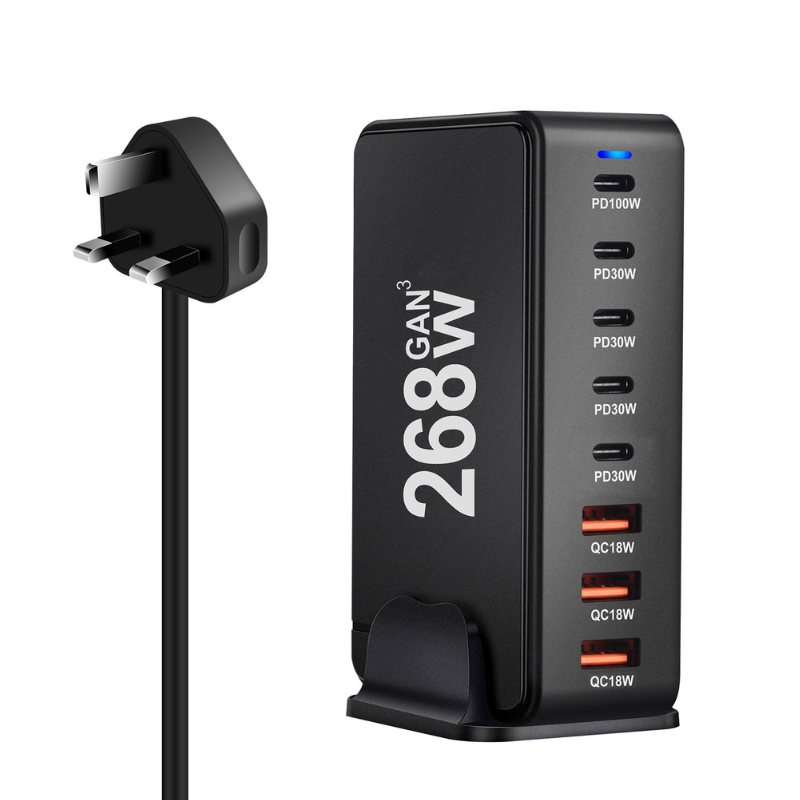
DigitPlus DP-868 GaN Pro 268W (3USB-A / 4USB-C) 7-Port FAST CHARGER
SKU: DigitPlus DP-868 GaN Pro 268W (3USB-A / 4USB-C)
In stock
The DigitPlus DP-868 GaN Pro 268W 7-Port Fast Charger is a cutting-edge charging solution designed for modern devices. Utilizing Gallium Nitride (GaN) technology, it delivers up to 268W of power through its 3 USB-A ports and 4 USB-C ports. This allows simultaneous charging of multiple devices at high speeds, making it ideal for tech enthusiasts, professionals, and households needing efficient and rapid charging capabilities.
12.900 OMR
In stock
1. **Plug in the Charger**: Connect the power cord of the DigitPlus DP-868 GaN Pro 268W charger to a suitable power outlet.
2. **Identify Charging Ports**: Locate the 3 USB-A ports and 4 USB-C ports on the charger. These ports are designed to accommodate different types of devices simultaneously.
3. **Connect Devices**: Plug your devices into the USB-A or USB-C ports using their respective cables. Ensure the cables are securely connected for efficient charging.
4. **Power On**: Once all devices are connected, press the power button on the charger if applicable, or it may automatically start supplying power to connected devices.
5. **Monitor Charging**: Monitor the charging status of each device. The GaN technology ensures fast and efficient charging, allowing multiple devices to charge simultaneously at high speeds.

There are no reviews yet.