Unboxing and Inspection:
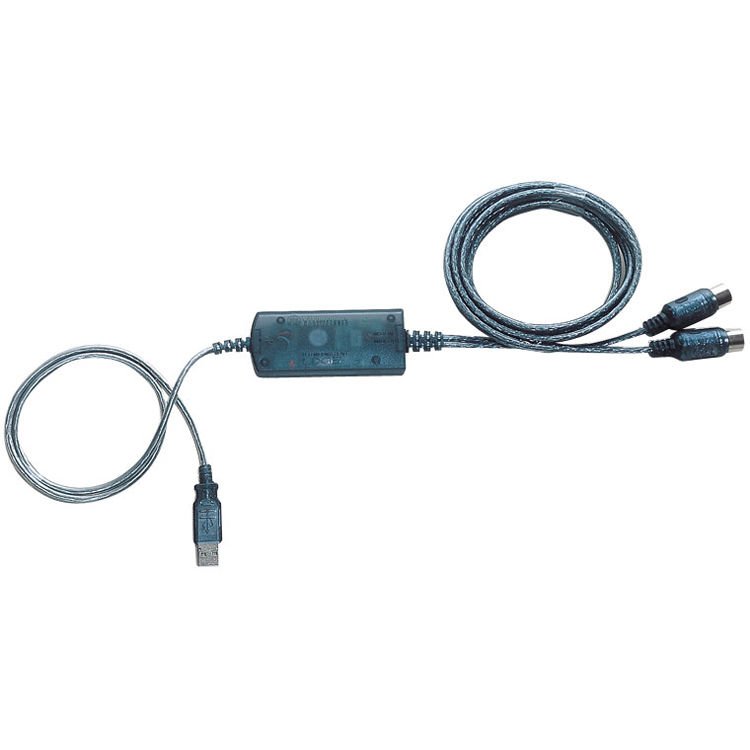
Carefully unbox the Yamaha UX-16 USB-MIDI Cable.
Inspect the cable and connectors to ensure there is no physical damage.
Software Installation (if required):
Depending on your computer’s operating system, you may need to install drivers for the Yamaha UX-16 USB-MIDI Cable.
Check the documentation or Yamaha’s website for the appropriate drivers and installation instructions.
Connect MIDI Instruments:
Connect one end of the MIDI cable to the MIDI Out port of your MIDI instrument (keyboard, synthesizer, etc.).
Ensure that the MIDI instrument is powered on and ready to transmit MIDI data.
Connect Computer:
Connect the other end of the MIDI cable to one of the USB ports on your computer.
The USB-MIDI cable will establish a connection between your MIDI instrument and your computer.
Power On:
Turn on your MIDI instrument.
Software Configuration:
Open your preferred music production software or digital audio workstation (DAW) on your computer.
Configure the software to recognize the Yamaha UX-16 USB-MIDI Cable as a MIDI input device.
Consult the software’s documentation for specific instructions on setting up MIDI devices.
Select MIDI Channels (if necessary):
If your MIDI instrument and software support multiple MIDI channels, configure them to communicate on the desired channels.
This step may vary depending on your specific setup and requirements.
Testing:
Play some notes or trigger MIDI events on your MIDI instrument.
Verify that the MIDI data is being transmitted to your computer and recognized by the software.
You should see MIDI input activity in your software’s MIDI track or monitor.
Recording and Playback:
Use your MIDI instrument to play and record MIDI data into your software.
You can record MIDI performances, edit MIDI notes, and control virtual instruments and synthesizers using your MIDI instrument.
Disconnecting:
When you’re finished using the Yamaha UX-16 USB-MIDI Cable, safely eject it from your computer.
Disconnect the cable from both your MIDI instrument and computer.
Storage:
Store the Yamaha UX-16 USB-MIDI Cable in a safe and dry place when not in use to prevent damage.
KCHIBO KK MP979 Mp3 Radio
USAMS Iphone 11 Pro Metal Camera Lens Glass Film
TJ 011 PHONE HOLDER
Ahuja Dpa 370 Amplifier
Dlc Rice Cooker 55110 1L
Black & Decker Stainless Steel Kettle JC450 1.7Ltr
Niimbot Label Thermal
Al-Harameen Azan Clock HA-4001
Philips 1000 Series Body Groomer BG1025/15
Jbl Quantum 650 Wireless Gaming Headset White
Philips OneBlade 360 Shaver QP2734/23
Laptop Power Cable with Fuse 3 Pin
Pu Xing Cassette Player & 3 Band Radio PX 250BT
Boya Larger Diaphragm Condenser Microphone By M1000
New Arrivals
Offers
Service & Repair


There are no reviews yet.