
-
×
 BBurago Metal Car Ferrari 296 GTB Size 1.18 18-16018
1 × 42.900 OMR
-
×
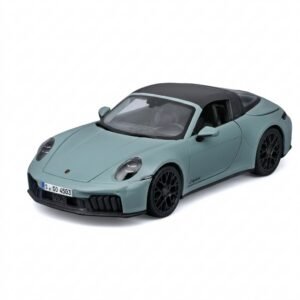 Maisto Metal Car Porsche 911 Targa 4 GTS Size 1.18 31470
1 × 42.885 OMR
-
×
 Hot Wheels Deutschland Design
2 × 4.900 OMR
-
×
 Maisto Metal Car Porsche 911 GT3 Size 1.18 36458
1 × 42.885 OMR
-
×
 DOBE PS4 TP4 016 Mobile Phone CLAMP
1 × 1.900 OMR
-
×
 SONY PS4 Rock of Ages 3 Game CD
1 × 13.800 OMR
-
×
 Cpt Guitar 3713c
1 × 3.800 OMR
-
×
 Ahuja Utp30 Wired Tie Clip Mic
1 × 10.000 OMR
-
×
 Sony PS4 Spider Man Game CD
1 × 12.900 OMR
-
×
 Casio Calculator MJ-120D Plus
1 × 5.900 OMR
-
×
 YSL KOUROS MEN'S EDT 100 ml
1 × 32.900 OMR
-
×
 Boya Larger Diaphragm Condenser Microphone By M1000
1 × 38.800 OMR
-
×
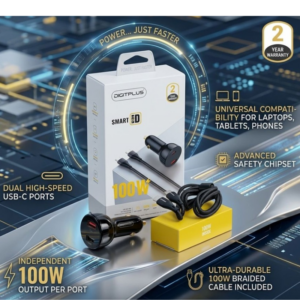 DigitPlus Car Charger 100w CC-DP-C101
1 × 8.900 OMR
-
×
 Xkin Charging Cable Xk-x219 Usb A To Micro 3A
1 × 0.700 OMR
-
×
 ANKER A80F1H11 544 USB-C to USB-C Data Cable (Bio-Based) 3ft
1 × 3.900 OMR
-
×
 WAHL 8467 SUPER TAPER
1 × 19.900 OMR
-
×
 Cle Usb Fridge
1 × 5.900 OMR
Subtotal: 297.770 OMR
 New Arrivals
 Offers
 Service & Repair


There are no reviews yet.