
-
×
 Tolaye Ks06 Keyboard Stand
1 × 14.000 OMR
-
×
 TAC TOOL 18 IN 1 HAMMER (HARD ROCK TOOLS)
1 × 3.900 OMR
-
×
 Used Nokia 6800
1 × 33.500 OMR
-
×
 Logitech Driving Force Shifter for G29/G920 941-000130
1 × 19.800 OMR
-
×
 Cleo-GA Handheld Video Game M27
1 × 23.900 OMR
-
×
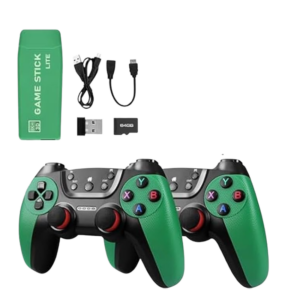 Cleo-GA 2.4G Wireless Game M22 Ultra
1 × 9.900 OMR
-
×
 ANKER NEBULA MARS 2PRO D2323211 PORTABLE PROJECTOR
1 × 199.800 OMR
-
×
 Sony PS5 Village Resident Evil Game CD
1 × 12.900 OMR
-
×
 SONY PS4 TOM CLANCY'S RAINBOW SIX SIEGE GAME CD
1 × 17.700 OMR
-
×
 Boya Lavalier Microphone By M40d
2 × 20.000 OMR
-
×
 Samsung Galaxy A36 5g 8gb 256gb
1 × 107.200 OMR
-
×
 GameSir F5 Falcon Mini Mobile Gaming Controller
1 × 3.900 OMR
-
×
 Boya By Wm4 Pro K3 2.4ghz Wireless Microphone System
1 × 49.900 OMR
Subtotal: 536.400 OMR
 New Arrivals
 Offers
 Service & Repair


There are no reviews yet.