
-
×
 Cle Usb Fridge
1 × 5.900 OMR
Cle Usb Fridge
1 × 5.900 OMR -
×
 Geepas GCR13011 Radio Cassette Recorder With USB/SD/MP3/BT
1 × 16.800 OMR
Geepas GCR13011 Radio Cassette Recorder With USB/SD/MP3/BT
1 × 16.800 OMR
Subtotal: 22.700 OMR
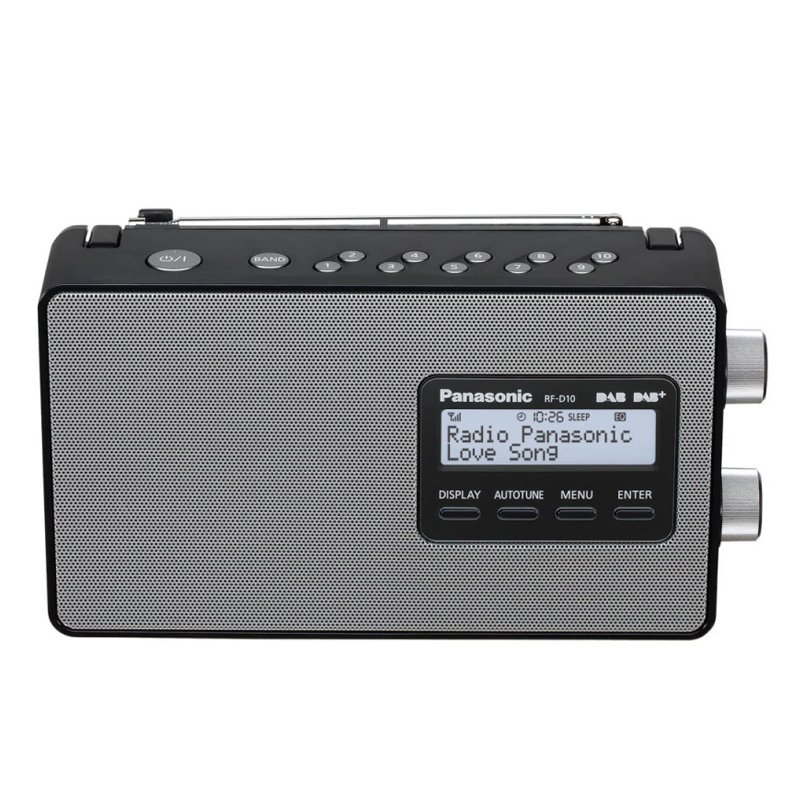
1. **Unboxing and Inspection**: Start by unboxing the PANASONIC RF-D10 BLACK NOIR DAB-FM Radio and ensure all components are present and undamaged. This typically includes the radio unit itself, power adapter, user manual, and any other accessories.
2. **Powering On and Setup**: Connect the power adapter to a suitable power outlet and the radio. Alternatively, insert the required batteries into the battery compartment. Turn on the radio using the power button or switch located on the radio’s panel.
3. **Tuning and Mode Selection**: Select the desired mode by using the mode selector switch or buttons. The PANASONIC RF-D10 BLACK NOIR offers both DAB (Digital Audio Broadcasting) and FM radio modes. Use the tuning dial or buttons to find and select your preferred radio station within the chosen mode.
4. **Volume and Sound Adjustment**: Adjust the volume level using the volume knob or buttons until you reach your preferred listening level. Some models may offer additional sound adjustment options such as bass and treble control for fine-tuning the audio output.
5. **Portability and Usage**: The PANASONIC RF-D10 BLACK NOIR DAB-FM Radio is designed for portability, making it suitable for various settings such as home, office, or outdoor use. Carry the radio with you using the built-in handle or place it on a stable surface for stationary listening. Enjoy listening to a wide range of radio stations in crystal-clear digital audio quality with DAB, or traditional FM radio broadcasts.
Following these steps will help you set up and enjoy your PANASONIC RF-D10 BLACK NOIR DAB-FM Radio with ease.
 New Arrivals
 Offers
 Service & Repair


There are no reviews yet.