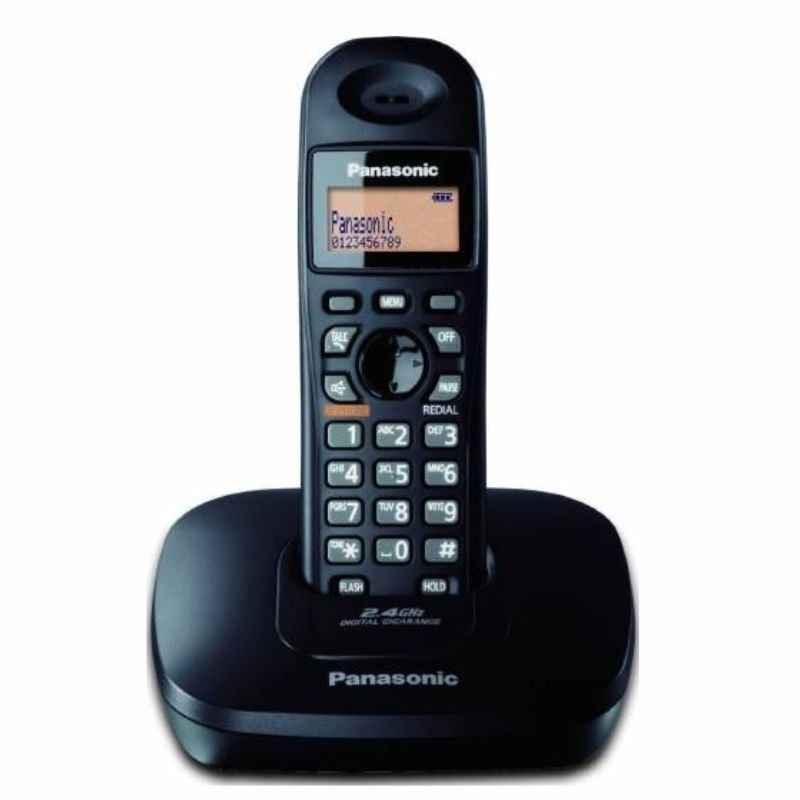
1. **Unboxing**: Carefully unpack the Panasonic KX-TG3611BX cordless phone and ensure all components are present, including the handset, base unit, phone cord, and power adapter.
2. **Base Unit Setup**:
– Place the base unit on a flat surface in a central location within range of a power outlet and telephone jack.
– Connect one end of the phone cord to the base unit’s LINE port and the other end to the telephone wall jack.
– Plug the power adapter into the base unit and then into a power outlet. The base unit should power on automatically.
3. **Handset Setup**:
– Insert the rechargeable batteries into the handset if they are not already installed. Follow the polarity markings to ensure correct placement.
– Place the handset on the base unit to charge for at least 7 hours before initial use.
4. **Initial Setup**:
– Once the handset is fully charged, remove it from the base unit.
– Follow the on-screen prompts to set the date, time, and language preferences on the handset.
5. **Register Handset (if applicable)**:
– If you have additional handsets to register with the base unit, follow the manufacturer’s instructions to register them. This typically involves placing the additional handsets on the base unit and following on-screen prompts.
6. **Make and Receive Calls**:
– To make a call, enter the phone number using the keypad on the handset and press the green call button. Alternatively, use the phonebook to dial saved contacts.
– To answer a call, press the green call button or the speakerphone button if you want to use the speakerphone function.
7. **Adjust Settings**:
– Use the menu button on the handset to access and adjust settings such as ringtone volume, handset volume, caller ID settings, and more.
8. **Additional Features**:
– Explore additional features such as caller ID, call waiting, call blocking, and intercom functionality if supported by your model.
9. **Troubleshooting**:
– If you encounter any issues during setup or use, refer to the user manual for troubleshooting tips and solutions.
10. **Power Off**:
– When not in use, place the handset back on the base unit to charge and conserve battery life. Ensure the base unit remains plugged in to maintain connectivity.
By following these steps, you can effectively set up and use the Panasonic KX-TG3611BX cordless phone for reliable communication in your home or office.
Hot Wheels Formula 1
Mercusys BE3600 Dual Band Wi-Fi 7 Router MR25BE
Mercusys AX3000 Dual-Band Wi-Fi 6 Router MR80X
Maisto Metal Car Porsche 911 GT3 Size 1.18 36458
Cleo-TY Mobile Hospital Set HT8123AP
Cleo-TY Baby Tricycle HT 4633
Cleo-TY Football Soccer Game HT2330
DOBE PS4 TP4 023B Charging STAND
Cleo-TY Children's Pinball Machine HT 9801
Cpt Ht-xm-6820 Wire Crane
Cleo-TY Combat Aircraft Fighter Jet HT-S30
Cleo-TY Aircraft Fighter Jet
Cleo-TY Kids Drawing Painting Table HT6886
SONY PS4 TOM CLANCY'S RAINBOW SIX SIEGE GAME CD
Telionix Digital Tea Maker TTM5015
Hot Wheels Deutschland Design
Sandisk Flash Drive i-xpand Dual Luxe 64GB Type-C to Lightning
Belkin F2CU012bt Mixit Cable Usb A to Micro 3mtr
Philips 1000 Series Body Groomer BG1025/15
Maisto Metal Car Porsche 911 Targa 4 GTS Size 1.18 31470
Google Fitbit Edge Fitness & Health Tracking Smart Band Green
Boya Lavalier Microphone By M40d
Philips OneBlade 360 Shaver QP2734/23
GT Autos Metal Car Bugatti Chiron Size 1.18 GTA-11010MB
OTVO P4 USB DATA CABLE (For P4 Host & Handle)
New Arrivals
Offers
Service & Repair

There are no reviews yet.