
 New Arrivals
 Offers
 Service & Repair

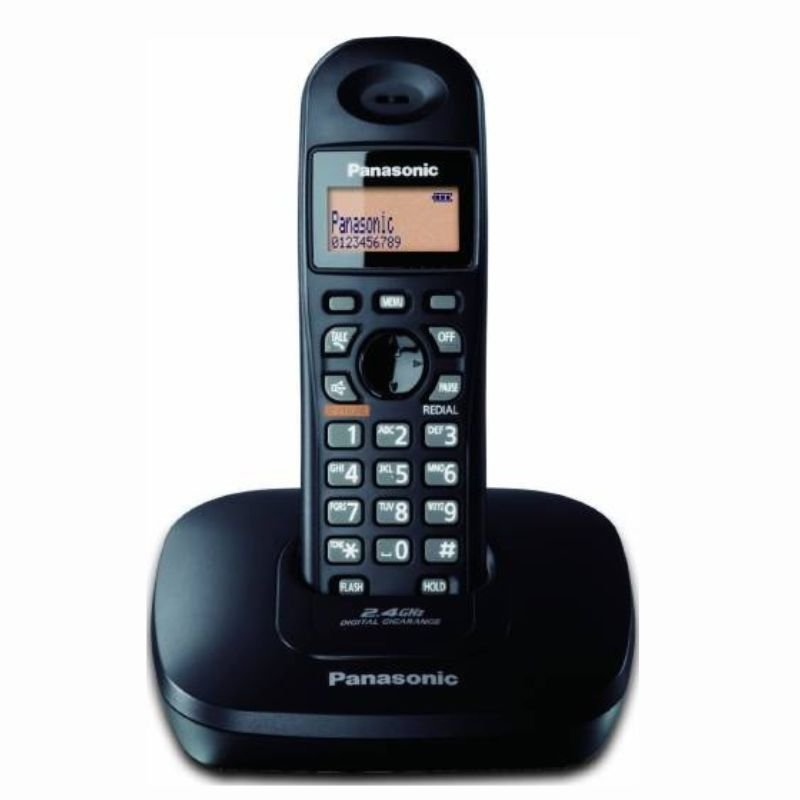
Panasonic Cordless Phone | KX-TG3611BX
SKU: 0413000004
Out of stock
The Panasonic KX-TG3611BX cordless phone offers reliable communication with convenient features. With its cordless design, users enjoy freedom of movement during calls. The phone includes features like caller ID, speakerphone functionality, and a built-in phonebook. Its easy-to-use interface and long-lasting battery make it ideal for home or office use. With Panasonic’s reputation for quality, the KX-TG3611BX ensures clear and uninterrupted communication.
Out of stock
1. **Unboxing**: Carefully unpack the Panasonic KX-TG3611BX cordless phone and ensure all components are present, including the handset, base unit, phone cord, and power adapter.
2. **Base Unit Setup**:
– Place the base unit on a flat surface in a central location within range of a power outlet and telephone jack.
– Connect one end of the phone cord to the base unit’s LINE port and the other end to the telephone wall jack.
– Plug the power adapter into the base unit and then into a power outlet. The base unit should power on automatically.
3. **Handset Setup**:
– Insert the rechargeable batteries into the handset if they are not already installed. Follow the polarity markings to ensure correct placement.
– Place the handset on the base unit to charge for at least 7 hours before initial use.
4. **Initial Setup**:
– Once the handset is fully charged, remove it from the base unit.
– Follow the on-screen prompts to set the date, time, and language preferences on the handset.
5. **Register Handset (if applicable)**:
– If you have additional handsets to register with the base unit, follow the manufacturer’s instructions to register them. This typically involves placing the additional handsets on the base unit and following on-screen prompts.
6. **Make and Receive Calls**:
– To make a call, enter the phone number using the keypad on the handset and press the green call button. Alternatively, use the phonebook to dial saved contacts.
– To answer a call, press the green call button or the speakerphone button if you want to use the speakerphone function.
7. **Adjust Settings**:
– Use the menu button on the handset to access and adjust settings such as ringtone volume, handset volume, caller ID settings, and more.
8. **Additional Features**:
– Explore additional features such as caller ID, call waiting, call blocking, and intercom functionality if supported by your model.
9. **Troubleshooting**:
– If you encounter any issues during setup or use, refer to the user manual for troubleshooting tips and solutions.
10. **Power Off**:
– When not in use, place the handset back on the base unit to charge and conserve battery life. Ensure the base unit remains plugged in to maintain connectivity.
By following these steps, you can effectively set up and use the Panasonic KX-TG3611BX cordless phone for reliable communication in your home or office.
Brand
PANASONIC
Based on 0 reviews
Be the first to review “Panasonic Cordless Phone | KX-TG3611BX”
Related products
-
Electronics
DOBE PS4 TP4 016 Mobile Phone CLAMP
– GAMERS’ GOOD NEWS: Say goodbye to the painful control on your smart phone.
– LARGE CAPACITY:Maximum support of 6-inch mobile phone.
– 2 in 1 holder: With an OTG cable you can enjoy your game with PS4 controller and it can be a smart mount itself.
– RSKU: 06010501000028

There are no reviews yet.