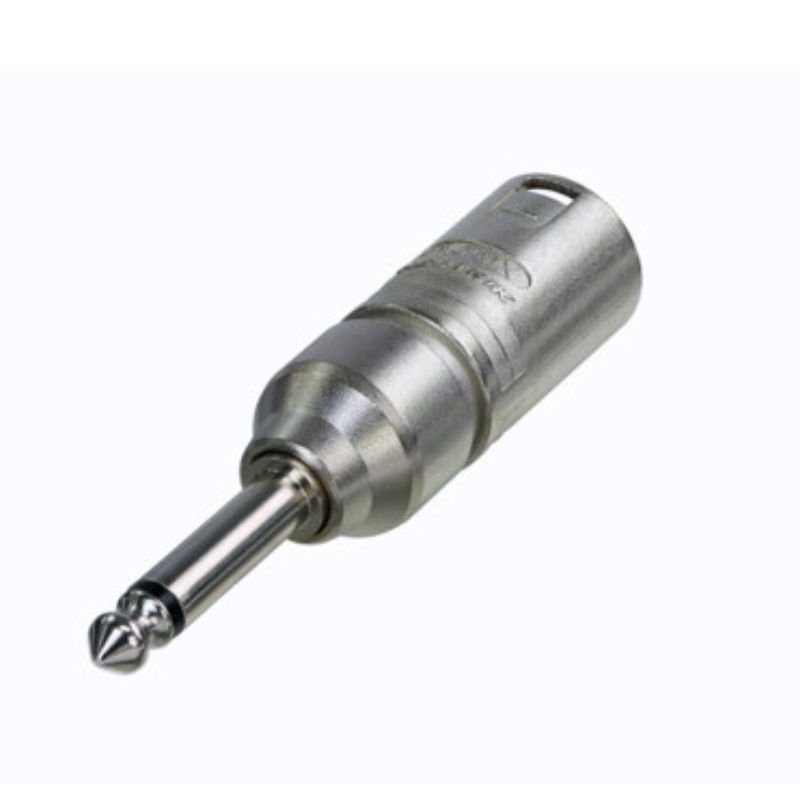
1. **Identify the Connector**: Locate the Neutrik NA2MP Connector. It typically consists of a male XLR connector on one end and a 1/4″ (6.35mm) stereo jack on the other end.
2. **Prepare the XLR Cable**: If you’re using an XLR cable, ensure that it has a female XLR connector at one end. If not, you may need to use a separate XLR adapter or cable with a female connector.
3. **Connect the XLR Cable**: Plug the female end of the XLR cable into the male XLR connector on the Neutrik NA2MP Connector. Ensure that the connection is secure to prevent any signal loss or interference.
4. **Identify the Stereo Device**: Determine the stereo device you want to connect to, such as a mixer, amplifier, or audio interface. Locate the 1/4″ (6.35mm) stereo jack input on the device.
5. **Connect to the Stereo Device**: Plug the 1/4″ (6.35mm) stereo jack end of the Neutrik NA2MP Connector into the stereo jack input on the stereo device. Ensure that the connection is secure to maintain proper signal transmission.
6. **Test the Connection**: Once the connections are made, test the audio signal by playing audio through the connected device. Check for any issues such as noise, distortion, or signal dropouts.
7. **Adjust Volume and Settings**: If necessary, adjust the volume and other settings on the connected device to achieve the desired audio levels and sound quality.
8. **Monitor the Connection**: Monitor the connection during use to ensure that it remains secure and stable. Avoid any excessive pulling or twisting of the cables to prevent damage to the connectors.
9. **Disconnecting**: When you’re finished using the Neutrik NA2MP Connector, carefully disconnect it from both the XLR cable and the stereo device. Hold the connector firmly and pull it straight out to avoid damaging the connectors.
10. **Storage**: Store the Neutrik NA2MP Connector and associated cables in a safe and dry place when not in use to prevent damage and ensure longevity.
Following these steps will allow you to effectively use the Neutrik NA2MP Connector to connect XLR devices to stereo equipment with 1/4″ (6.35mm) inputs.

 WAHL HERO PROFESSIONAL TRIMMER 8991
1 × 32.800 OMR
WAHL HERO PROFESSIONAL TRIMMER 8991
1 × 32.800 OMR  Kalimba 17 Keys Finger Piano
1 × 13.800 OMR
Kalimba 17 Keys Finger Piano
1 × 13.800 OMR  Biba Flute Deluxe
1 × 6.500 OMR
Biba Flute Deluxe
1 × 6.500 OMR  Cleo Plastic Recorder
1 × 0.700 OMR
Cleo Plastic Recorder
1 × 0.700 OMR  New Arrivals
 Offers
 Service & Repair



There are no reviews yet.