
-
×
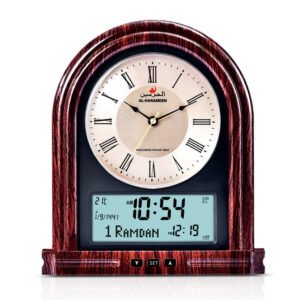 AL-HARAMEEN AZAN CLOCK HA-7041
1 × 21.900 OMR
Subtotal: 21.900 OMR

SKU: KAKU TAB S6 LITE Leather Case
Out of stock
The KAKU Samsung P615 Tab S6 Lite Leather Case is a stylish and functional accessory designed specifically for the Samsung Galaxy Tab S6 Lite (model P615). Crafted from high-quality leather, this case offers durable protection against scratches, bumps, and daily wear and tear. Its precise cutouts provide easy access to all ports, buttons, and features of the tablet, while its built-in stand allows for convenient hands-free viewing in multiple angles. With its sleek design and premium materials, the KAKU leather case enhances both the aesthetics and usability of the Samsung Galaxy Tab S6 Lite.
Out of stock
1. **Unboxing**: Carefully open the packaging of the KAKU Samsung P615 Tab S6 Lite Leather Case and remove all contents.
2. **Inspect Contents**: Ensure that all components listed in the product manual are included in the package. This typically includes the leather case and any additional accessories.
3. **Prepare Your Tablet**: If your tablet is not already in the case, carefully insert it into the designated slots or compartments of the case. Ensure that the tablet fits snugly and securely.
4. **Secure the Tablet**: Once the tablet is in place, ensure that it is securely fastened within the case. Some cases feature straps, Velcro, or magnetic closures to keep the tablet in place.
5. **Adjust Stand (If Applicable)**: If the case has a built-in stand, adjust it to your desired viewing angle. Many cases offer multiple viewing angles for optimal comfort and usability.
6. **Test Functionality**: Test all ports, buttons, and features of your tablet while it’s in the case to ensure that they are easily accessible and functional.
7. **Close the Case**: Close the case securely to protect your tablet from dust, scratches, and other damage. Ensure that any closures, such as zippers or snaps, are properly fastened.
8. **Carry and Use**: Carry your tablet in the KAKU Samsung P615 Tab S6 Lite Leather Case and use it as needed for work, entertainment, or other activities.
9. **Maintenance**: Keep your leather case clean by wiping it with a soft, dry cloth as needed. Avoid exposing it to moisture, direct sunlight, or extreme temperatures to prevent damage.
By following these steps, you can effectively use the KAKU Samsung P615 Tab S6 Lite Leather Case to protect and enhance the functionality of your tablet.
 New Arrivals
 Offers
 Service & Repair


There are no reviews yet.