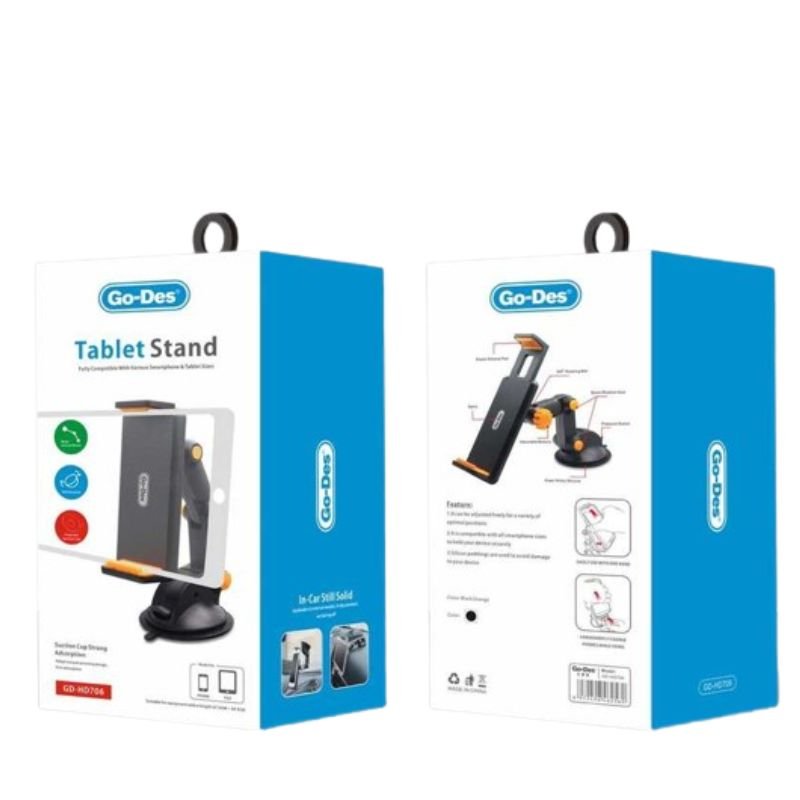
1. **Unbox and Assemble**: Begin by unboxing the GO-DES HD706 Tablet Stand and identifying its components, including the base, stand, and adjustable arms. Assemble the stand by inserting the stand into the base securely until it clicks into place.
2. **Adjust the Arms**: Depending on the size of your tablet, adjust the arms of the stand to accommodate its width. Loosen the knobs or screws on the sides of the stand and extend or retract the arms to fit your tablet snugly.
3. **Secure Your Tablet**: Once the arms are adjusted, place your tablet horizontally or vertically between the arms of the stand. Ensure that the tablet rests securely on the stand and that the arms provide enough support to hold it in place.
4. **Adjust the Viewing Angle**: Tilt the tablet stand to your desired viewing angle by adjusting the hinge or swivel mechanism located between the base and the stand. Tighten any screws or knobs to lock the stand in place once you’ve found the optimal viewing position.
5. **Enjoy Hands-Free Use**: With your tablet securely mounted on the GO-DES HD706 Tablet Stand and positioned at your preferred angle, you’re all set to enjoy hands-free use. Whether you’re watching videos, reading documents, or video calling, the stand provides stable support for your tablet, enhancing your overall viewing experience.
Jbl Quantum 650 Wireless Gaming Headset Black
SONY PS4 NIOH 2 GAME CD
WONDER WAX HAIR KIT
Cle Usb Fridge
DOBE PS4 TP4 023B Charging STAND
DUDAO AUX 3.5 mm Cable Connector
Cleo-EL Digital Quran Speaker SQ168
Boya By Wm4 Pro K3 2.4ghz Wireless Microphone System
Tolaye Ks06 Keyboard Stand
Cleo-GA Lxradeo Ergonomic Gaming Chair
Dji Osmo Nano Action Camera 128GB
K8 TYPE C MOBILE PHONE THERMOMETER
Philips OneBlade 360 Shaver QP2734/23
New Arrivals
Offers
Service & Repair


There are no reviews yet.