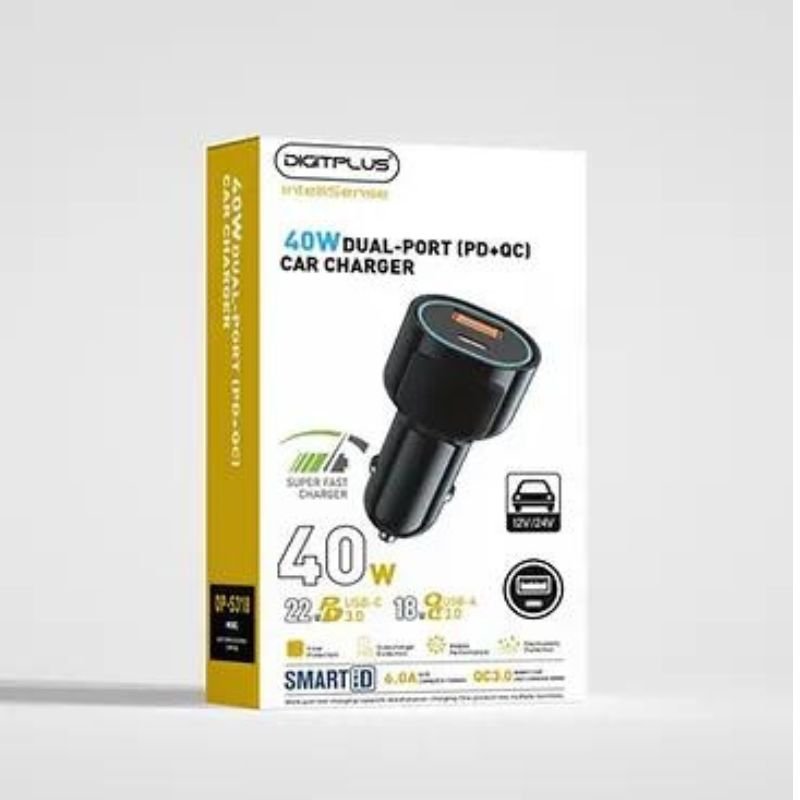
1. **Plug into Car’s Power Outlet:** Insert the DigitPlus DP-S320 charger into your car’s power outlet, typically located near the dashboard or center console. Ensure it is securely inserted to establish a connection.
2. **Identify the Charging Ports:** Locate the two USB-C ports on the charger. These ports support Power Delivery (PD) technology, allowing for fast and efficient charging of compatible devices.
3. **Connect Your Devices:** Plug your devices into the USB-C ports using compatible charging cables. Ensure that the cables are securely connected to both the charger and your devices.
4. **Start Charging:** Once your devices are connected, the charger will automatically start delivering power. The advanced PD technology enables rapid charging, providing up to 40W of total power output shared between the two ports.
5. **Monitor Charging Status:** Keep an eye on the charging status of your devices. Many devices display a charging indicator, and you can also check the battery level on their screens. Once your devices are fully charged, you can safely unplug them from the charger.
With these steps, you can effectively use the DigitPlus DP-S320 40W Dual-Port PD Fast Car Charger to keep your devices powered up while on the road.
Tolaye Ks06 Keyboard Stand
Used Nokia X3 02 Touch
Sandisk Ultra SD Memory Card 128GB - 140MB/s
NOKIA Used 3310 (Old Model)
Cleo Plastic Recorder
Yasmina Mini Smart Portable Bluetooth Speaker Grey
YH 31 PS4 2 in 1 Charging Heat Sink
Boya Wireless Microphone By Wm4 Pro
USAMS Iphone 11 Pro Metal Camera Lens Glass Film
Sandisk Ultra SDHC UHS-1 SD Card 32 GB
Cle Usb Fridge
Yasmina Mini Smart Portable Bluetooth Speaker Black
New Arrivals
Offers
Service & Repair

There are no reviews yet.