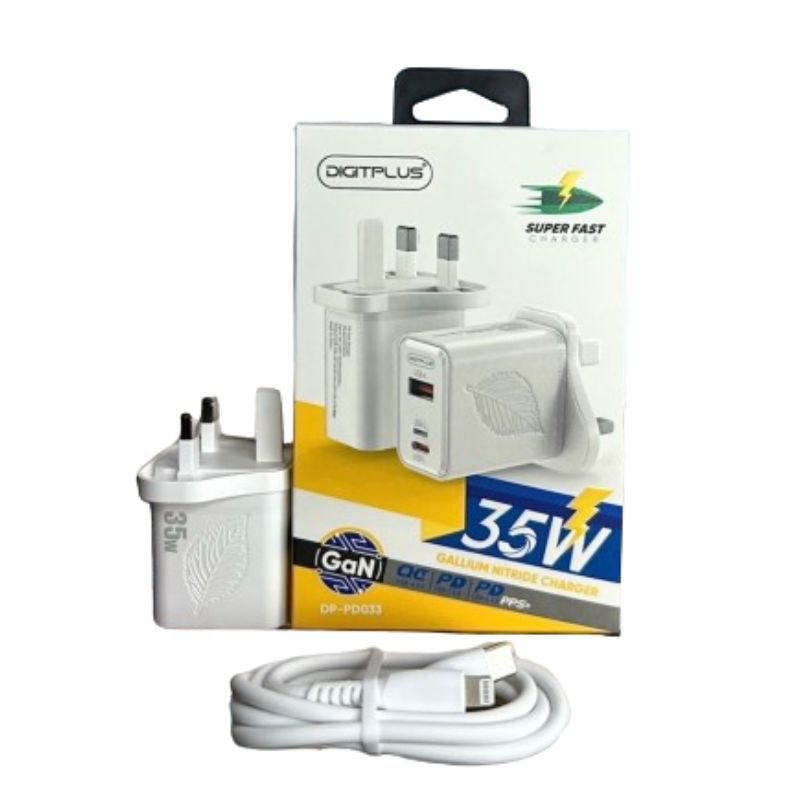
1. **Plug-In:** Begin by plugging the DigitPlus DP-PD033 Gan 35W TRIO Port Charger into a compatible power outlet using its standard AC plug. Ensure the outlet is in good condition and compatible with the charger’s specifications.
2. **Select Charging Cable:** Choose the appropriate charging cable for your device. The charger accommodates three types: USB-A, USB-C, and Lightning, offering versatility to charge a wide range of devices such as smartphones, tablets, and more.
3. **Connect Devices:** Connect your devices to the charger using the selected charging cables. Insert the USB-A, USB-C, or Lightning connectors securely into the corresponding ports on the charger. Make sure the connections are firm to ensure efficient charging.
4. **Power On:** Once all devices are connected, ensure the power source is switched on. The charger may have an indicator light to signal that it’s receiving power. If applicable, check that your devices acknowledge they’re being charged.
5. **Monitor Charging:** Monitor the charging progress of your devices. The DigitPlus DP-PD033 Gan 35W TRIO Port Charger utilizes advanced GaN technology for superfast charging, ensuring your devices are powered up quickly and efficiently. Once charging is complete, safely disconnect your devices from the charger.

 XBOX ONE FAST AND FURIOUS GAME CD
1 × 19.900 OMR
XBOX ONE FAST AND FURIOUS GAME CD
1 × 19.900 OMR  SONY PS4 Final Fantasy XII GAME CD
1 × 8.800 OMR
SONY PS4 Final Fantasy XII GAME CD
1 × 8.800 OMR  SONY PS4 MDIEVIL GAME CD
1 × 11.000 OMR
SONY PS4 MDIEVIL GAME CD
1 × 11.000 OMR  L-1 Professional Streaming Player Stand
1 × 13.900 OMR
L-1 Professional Streaming Player Stand
1 × 13.900 OMR  New Arrivals
 Offers
 Service & Repair

There are no reviews yet.