
-
×
 Max Bms 135 Boom Mic Stand
1 × 9.500 OMR
-
×
 Tovaste Tajj10 Jack To Jack Cable 10 Mtr
1 × 6.500 OMR
-
×
 Sony PS5 Village Resident Evil Game CD
1 × 12.900 OMR
-
×
 OMNIKEY 3121 CARD READER
1 × 7.900 OMR
-
×
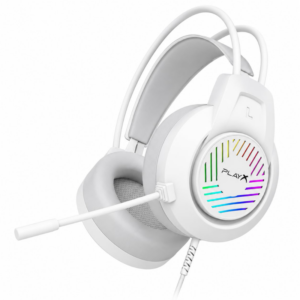 PlayX Wired Gaming Headset HSY-0211
1 × 7.900 OMR
-
×
 YH 25 PS4 Multifunctional Heat Dissipation Charging Bracket
1 × 12.900 OMR
-
×
 Cle Usb Fridge
2 × 5.900 OMR
-
×
 Used Nokia X3 02 Touch
1 × 20.500 OMR
-
×
 DOBE PS4 TP4 023B Charging STAND
1 × 6.900 OMR
-
×
 YH 31 PS4 2 in 1 Charging Heat Sink
1 × 11.900 OMR
-
×
 Boya Larger Diaphragm Condenser Microphone By M1000
1 × 38.800 OMR
-
×
 SONY PS4 Rocket Arena Game CD
1 × 16.800 OMR
-
×
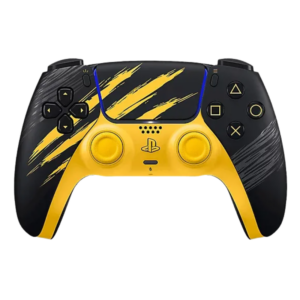 Sony Ps 5 Controller Marvel Wolverine Limited Edition
1 × 42.900 OMR
-
×
 Bm 13k Bee Melodica
2 × 5.900 OMR
-
×
 Candc DC C9 Cardioid Microphone
1 × 3.500 OMR
-
×
 Tolaye Ks06 Keyboard Stand
1 × 14.000 OMR
-
×
 Sony Ps 5 Panda Hero CD
1 × 14.900 OMR
-
×
 Cleo Plastic Recorder
1 × 0.700 OMR
-
×
 Apple Ipad Pro 12.9" 4th Gen Smart Keyboard Folio
1 × 94.900 OMR
-
×
 Canon GI-490 Cyan Ink
1 × 4.800 OMR
-
×
 Lavalier Microphone Lj02
1 × 1.800 OMR
-
×
 DUDAO AUX 3.5 mm Cable Connector
1 × 3.900 OMR
Subtotal: 357.500 OMR
 New Arrivals
 Offers
 Service & Repair


There are no reviews yet.