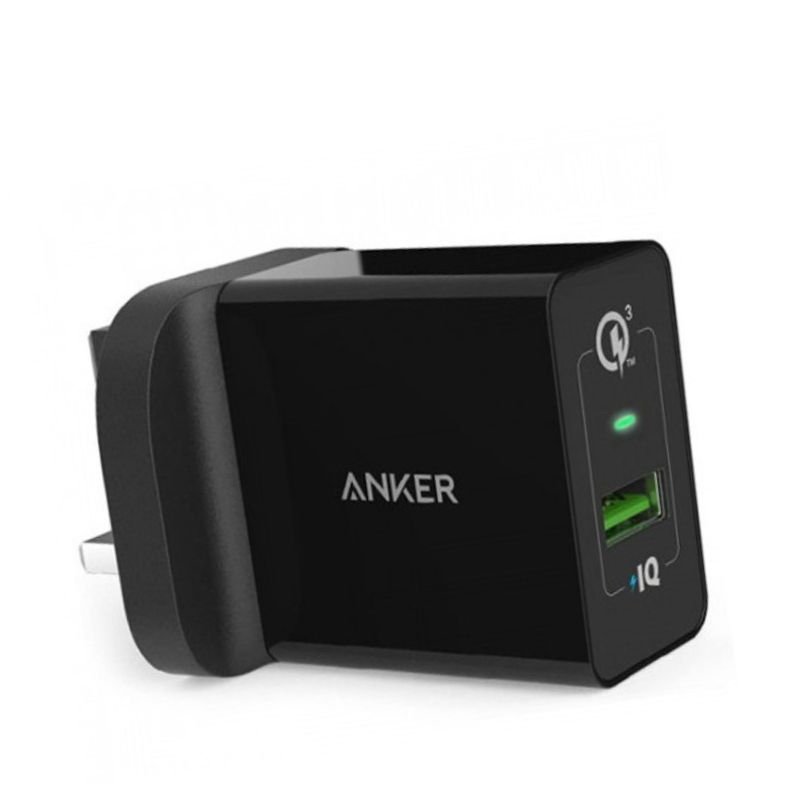
1. **Plug In**: Start by locating a suitable power outlet in your home or office. Insert the foldable plug of the ANKER Home Charger into the outlet securely. Ensure the outlet is working properly by testing it with another device if necessary.
2. **Connect Device**: Take the USB charging cable of your device (such as a smartphone or tablet) and connect it to the USB port of the ANKER Home Charger. Make sure the connection is firm and secure to avoid any interruptions during charging.
3. **Power On**: Once the charger is plugged in and your device is connected, you should see the LED indicator light on the charger illuminate, indicating that it is receiving power and ready to charge your device.
4. **Charging Process**: Your device should start charging automatically once it’s connected to the ANKER Home Charger. You can check the charging status on your device’s screen or by observing any charging indicators. The PowerIQ technology of the charger ensures fast and efficient charging for your device.
5. **Unplug and Store**: Once your device is fully charged or you no longer need to charge it, safely disconnect the USB cable from the charger and your device. Unplug the ANKER Home Charger from the power outlet and fold the plug if you’re storing it away or traveling. This helps prevent any damage to the charger or your device and ensures safety when not in use.
Blue Fire Hydrojet Portable Oral Irrigator BF-6
USAMS Iphone 11 Pro Metal Camera Lens Glass Film
Despada Club Optical Frame DSC 5290 C4
Sandisk Flash Drive i-xpand Dual Luxe 64GB Type-C to Lightning
Biba Flute Deluxe
WAHL HERO PROFESSIONAL TRIMMER 8991
Yamaha Dme8ic Mixing Engine Matrice Audio
REDOFF SUNGLASS
YH 31 PS4 2 in 1 Charging Heat Sink
SONY PS4 Rocket Arena Game CD
Behringer Sl 2442fx 24 Channels Mixer
Boya Larger Diaphragm Condenser Microphone By M1000
Behringer Flow 8 Mixer
Used NOKIA 9300
New Arrivals
Offers
Service & Repair


There are no reviews yet.