
-
×
 Cpt Guitar 3713c
1 × 3.800 OMR
-
×
 Candc DC C9 Cardioid Microphone
1 × 3.500 OMR
-
×
 SONY PS4 STAR WARS SQUADRONS GAME CD
1 × 15.800 OMR
-
×
 Sayona Robot Vacuum Cleaner SBV2458S
1 × 69.900 OMR
-
×
 Meroon Is 75b Mic Stand Round Base
1 × 10.000 OMR
-
×
 Boya Larger Diaphragm Condenser Microphone By M1000
1 × 38.800 OMR
-
×
 Ahuja Trinity 411 Microphone
1 × 35.000 OMR
-
×
 Sony PS 5 DualSense Wireless Controller Limited Edition Alpine Green
1 × 25.900 OMR
-
×
 Mini Auto Metal Car BMW M8 GTE DT-8034A 3D Frame
1 × 6.800 OMR
-
×
 Sony Ps 4 Mdievil CD
1 × 11.000 OMR
-
×
 Used Nokia E61i
1 × 40.000 OMR
-
×
 DUDAO AUX 3.5 mm Cable Connector
1 × 3.900 OMR
-
×
 Sandisk Flash Drive i-xpand Dual Luxe 64GB Type-C to Lightning
1 × 11.500 OMR
-
×
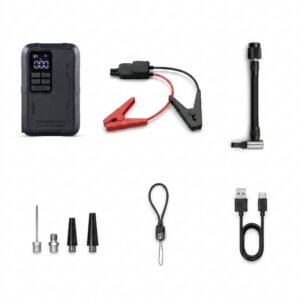 Blue Fire Mini Jump Starter BF-J06
1 × 24.900 OMR
-
×
 Telionix Electric Air Fryer 9L TAF4424
1 × 34.900 OMR
-
×
 DOBE PS4 TP4 023B Charging STAND
1 × 6.900 OMR
-
×
 L-1 Professional Streaming Player Stand
1 × 13.900 OMR
Subtotal: 356.500 OMR
 New Arrivals
 Offers
 Service & Repair


There are no reviews yet.