
 أقل سعر
 الخدمة والإصلاح

 أحدث
أحدث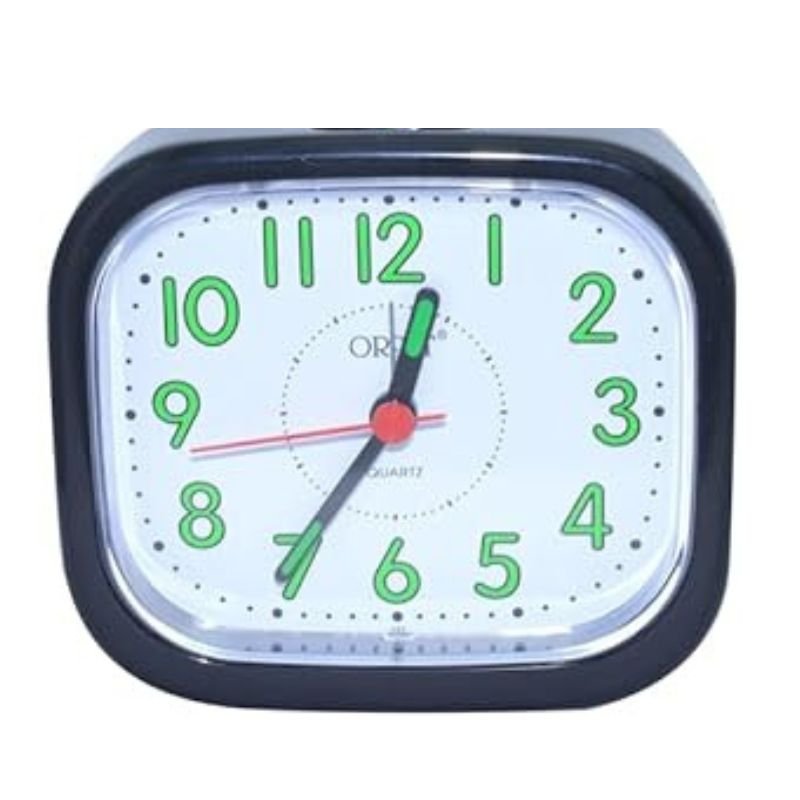
REEON RN 316 ALARM CLOCK
SKU: REEON RN 316 ALARM CLOCK
غير متوفر في المخزون
The REEON RN 316 Alarm Clock is a sleek and modern timepiece designed to wake you up reliably every morning. With its simple yet stylish design, it fits seamlessly into any bedroom decor. Equipped with a clear digital display, it shows the time prominently, ensuring you can check it at a glance. Its alarm function offers multiple customizable settings, allowing you to wake up to your preferred sound or radio station. The snooze function provides a few extra minutes of sleep, while the backup battery ensures that even power outages won’t disrupt your morning routine. The REEON RN 316 Alarm Clock is your dependable companion for starting each day on time and in style.
غير متوفر في المخزون
1. **Unboxing**: Start by unpacking the REEON RN 316 Alarm Clock from its packaging. Ensure that all the components are present, including the main unit, power adapter (if required), and any user manuals or documentation.
2. **Powering On**: Plug in the alarm clock using the provided power adapter, if necessary. Once connected to power, the clock should power on automatically. If there’s a battery compartment, you may need to insert batteries for backup power in case of outages.
3. **Setting the Time**: The clock may initially display the default time or flash 12:00 indicating that it needs to be set. Look for the “Set Time” or similar button on the clock’s interface. Press and hold this button until the time display starts flashing. Then, use the directional buttons or dial (if applicable) to adjust the hours and minutes to the correct time. Press the “Set Time” button again to confirm.
4. **Setting the Alarm**: To set the alarm, locate the “Set Alarm” button on the clock. Press and hold this button until the alarm time starts flashing. Use the directional buttons or dial to adjust the desired alarm time. Some models may allow you to set multiple alarms or choose specific days for the alarm to repeat.
5. **Choosing Alarm Sound**: Depending on the model, you may have options for the alarm sound. Look for buttons labeled “Alarm Sound” or similar. Press these buttons to cycle through the available sound options, which may include beeping, radio, or nature sounds.
6. **Testing the Alarm**: After setting the alarm, it’s a good idea to test it to ensure it will wake you up at the desired time. Simply set the alarm to go off a few minutes ahead and wait for it to trigger.
7. **Snooze Function**: Most alarm clocks have a snooze function that allows you to temporarily silence the alarm and catch a few extra minutes of sleep. When the alarm sounds, look for the snooze button and press it to activate this feature.
8. **Turning Off the Alarm**: To turn off the alarm completely, locate the “Alarm Off” or similar button on the clock. Press this button when the alarm sounds to stop it from ringing.
9. **Additional Features**: Explore any additional features the REEON RN 316 Alarm Clock may offer, such as radio tuning, backlight adjustment, or temperature display.
10. **Maintenance**: Periodically check the clock’s batteries if it has backup power to ensure they’re still functioning properly. Clean the clock’s surface and buttons as needed to keep it looking and functioning its best.
By following these steps, you can easily set up and use the REEON RN 316 Alarm Clock to wake you up reliably every morning.

لا توجد مراجعات حتى الآن.