
-
×
 BOYA LARGER DIAPHRAGM CONDENSER MICROPHONE BY M1000
1 × 38.800 OMR
BOYA LARGER DIAPHRAGM CONDENSER MICROPHONE BY M1000
1 × 38.800 OMR
المجموع: 38.800 OMR
SKU: 41511000014
متوفر في المخزون
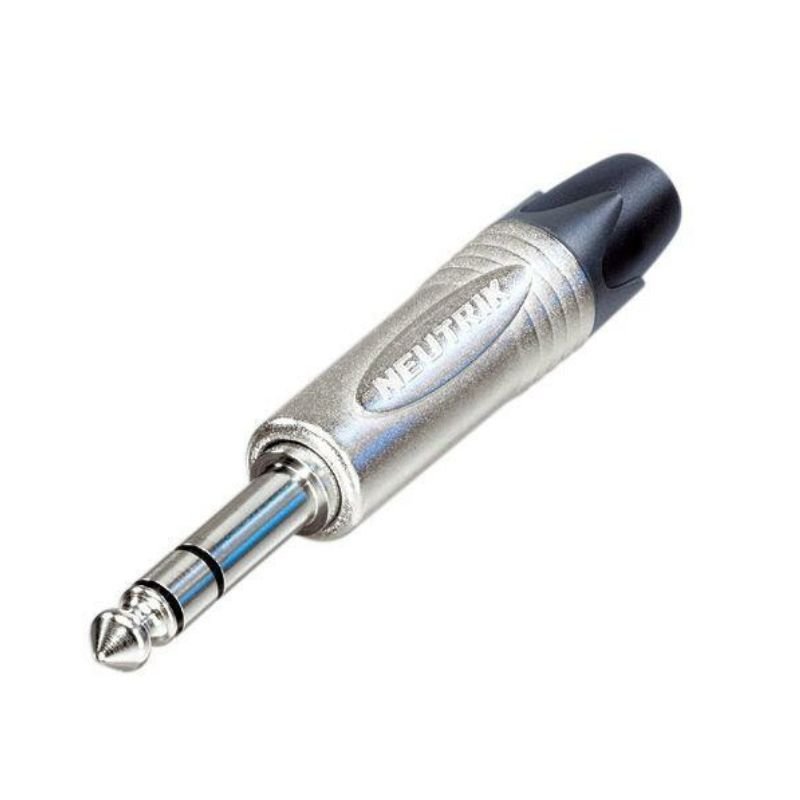
The Neutrik NP3X Connector is a professional-grade 1/4″ (6.35mm) TRS jack plug renowned for its durability and reliability. Featuring a robust design and precise engineering, it ensures secure connections for audio signals in various applications, including studio equipment, musical instruments, and sound systems. The NP3X Connector is equipped with a nickel-plated housing for enhanced durability and conductivity, making it a preferred choice among audio professionals worldwide.
2.500 OMR
متوفر في المخزون
1. **Identify the Connector**: Locate the Neutrik NP3X Connector. It typically has a cylindrical metal body with a threaded section at one end and a slot for the cable at the other end.
2. **Prepare the Cable**: Strip the outer insulation of the audio cable to expose the inner wires. Ensure that you strip just enough insulation to reveal the required length of wires for proper connection.
3. **Prepare the Wires**: If the cable has multiple wires, such as a stereo audio cable, separate and strip each wire individually. You may need to use wire strippers to do this accurately.
4. **Identify the Terminals**: The Neutrik NP3X Connector usually has three terminals: Tip (T), Ring (R), and Sleeve (S). These terminals correspond to the different sections of the TRS (Tip-Ring-Sleeve) connector.
5. **Solder the Wires**: Tin the exposed wires by applying solder to them. Then, solder each wire to its respective terminal on the NP3X Connector. Typically, the tip wire goes to the T terminal, the ring wire to the R terminal, and the sleeve wire to the S terminal.
6. **Check Connections**: After soldering, double-check each connection to ensure there are no loose wires or solder joints. A good connection is essential for reliable audio transmission.
7. **Secure the Cable**: Once all wires are securely soldered, carefully insert the cable into the connector’s body, ensuring that the wires go into the correct sections and terminals.
8. **Assemble the Connector**: Screw the threaded section of the connector onto the body to secure the cable in place. Tighten it firmly but avoid over-tightening, as this could damage the connector or cable.
9. **Test the Connection**: Plug the Neutrik NP3X Connector into the appropriate jack on your audio equipment and test the connection. Ensure that audio signals are transmitted properly and that there are no issues with connectivity or sound quality.
10. **Maintenance**: Periodically inspect the connector for any signs of wear or damage, and clean it if necessary. Proper maintenance ensures the longevity and reliability of the Neutrik NP3X Connector.
Following these steps will allow you to effectively use the Neutrik NP3X Connector for secure and reliable audio connections in various professional audio setups.
Here’s a step-by-step description for using the Neutrik NP3X Connector:
1. **Identify the Connector**: Locate the Neutrik NP3X Connector. It typically has a cylindrical metal body with a threaded section at one end and a slot for the cable at the other end.
2. **Prepare the Cable**: Strip the outer insulation of the audio cable to expose the inner wires. Ensure that you strip just enough insulation to reveal the required length of wires for proper connection.
3. **Prepare the Wires**: If the cable has multiple wires, such as a stereo audio cable, separate and strip each wire individually. You may need to use wire strippers to do this accurately.
4. **Identify the Terminals**: The Neutrik NP3X Connector usually has three terminals: Tip (T), Ring (R), and Sleeve (S). These terminals correspond to the different sections of the TRS (Tip-Ring-Sleeve) connector.
5. **Solder the Wires**: Tin the exposed wires by applying solder to them. Then, solder each wire to its respective terminal on the NP3X Connector. Typically, the tip wire goes to the T terminal, the ring wire to the R terminal, and the sleeve wire to the S terminal.
6. **Check Connections**: After soldering, double-check each connection to ensure there are no loose wires or solder joints. A good connection is essential for reliable audio transmission.
7. **Secure the Cable**: Once all wires are securely soldered, carefully insert the cable into the connector’s body, ensuring that the wires go into the correct sections and terminals.
8. **Assemble the Connector**: Screw the threaded section of the connector onto the body to secure the cable in place. Tighten it firmly but avoid over-tightening, as this could damage the connector or cable.
9. **Test the Connection**: Plug the Neutrik NP3X Connector into the appropriate jack on your audio equipment and test the connection. Ensure that audio signals are transmitted properly and that there are no issues with connectivity or sound quality.
10. **Maintenance**: Periodically inspect the connector for any signs of wear or damage, and clean it if necessary. Proper maintenance ensures the longevity and reliability of the Neutrik NP3X Connector.
Following these steps will allow you to effectively use the Neutrik NP3X Connector for secure and reliable audio connections in various professional audio setups.
*Ideal for youtube,vloggings,podcasts,mobile journalism and more *digital 2.4GHZwirleless system *apple MFI certified lightning connector *compatible with iOS device:ipad,iphone,ipod touch *master volume control *omnidirectional lavalier microphone included
 أقل سعر
 الخدمة والإصلاح

 أحدث
أحدث

لا توجد مراجعات حتى الآن.