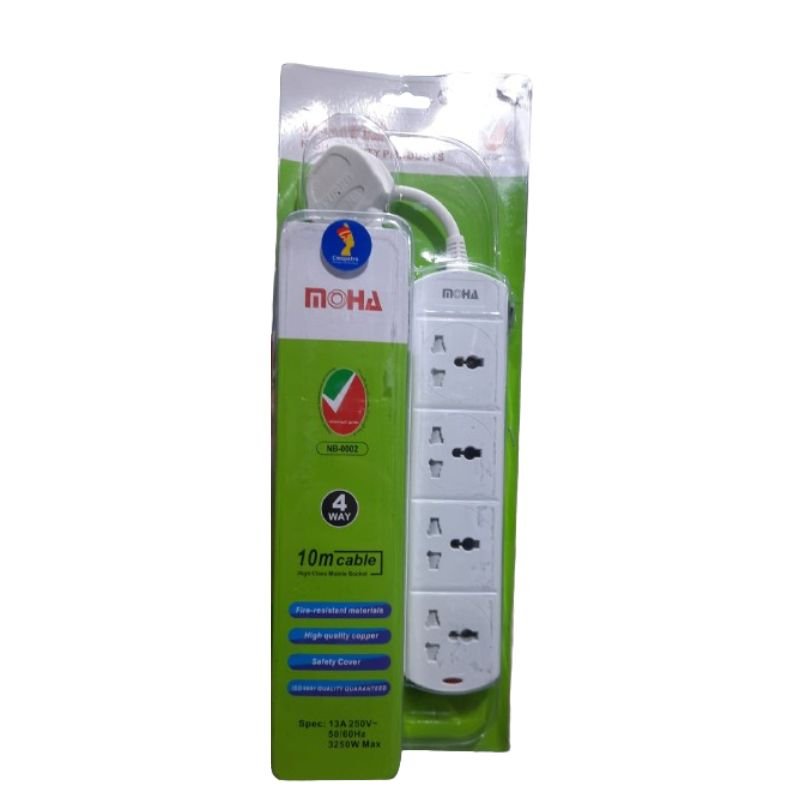
1. **Inspect the Extension Socket**: Before use, carefully inspect the MOHA 77 6124WM10 extension socket for any visible damage or defects. Ensure that all components, including the sockets and cable, are intact and in good condition.
2. **Choose a Suitable Location**: Select a suitable location to place the extension socket. Ensure that it is positioned where it can easily reach the power source and where the connected devices will be used. Avoid placing it in areas prone to moisture or where it may be stepped on.
3. **Unroll the Cable**: Carefully unroll the 10-meter long cable of the extension socket, ensuring that it is free from tangles or knots. Lay it out in the desired location, taking care to avoid tripping hazards or obstruction.
4. **Plug into Power Outlet**: Insert the plug of the MOHA 77 6124WM10 extension socket into a standard power outlet. Ensure that the outlet can provide the required voltage for your devices.
5. **Identify the Sockets**: Locate the four sockets on the extension socket. They are typically arranged in a row or cluster along the cable for easy access.
6. **Plug in Devices**: Identify the electronic devices you want to connect and plug them into the available sockets on the extension socket. Ensure that the devices are compatible with the voltage and power rating of the extension socket.
7. **Distribute Load Evenly**: Distribute the load evenly among the sockets to prevent overload. Avoid connecting devices that exceed the maximum load capacity of the socket.
8. **Use with Caution**: Exercise caution while using the extension socket, especially when handling electrical appliances. Avoid overloading the socket or using it with damaged cords or plugs.
9. **Monitor for Overheating**: Periodically check the extension socket and connected devices for signs of overheating. If you notice any unusual heat or burning smells, immediately disconnect the devices and allow the socket to cool down.
10. **Disconnect Safely**: When you’re done using the extension socket, safely disconnect the devices by unplugging them from the sockets. Then, unplug the extension socket from the power outlet.
11. **Roll Up the Cable**: Carefully roll up the cable of the MOHA 77 6124WM10 extension socket, ensuring that it is neatly coiled without any twists or kinks. Properly store the extension socket in a dry and safe place when not in use.
Following these steps will help you safely and effectively use the MOHA 77 6124WM10 4 Way 10m Extension Socket to power multiple electronic devices over a longer distance.
Sandisk Flash Drive i-xpand Dual Luxe 64GB Type-C to Lightning
Belkin F2CU012bt Mixit Cable Usb A to Micro 3mtr
Google Fitbit Edge Fitness & Health Tracking Smart Band Black
Google Fitbit Edge Fitness & Health Tracking Smart Band Green
AHUJA UTP30 WIRED TIE CLIP MIC
FANTECH FTK 801 NUMERIC KEY PAD
WAHL ELITE PRO HAIRCUTTING KIT
Sony PS4 Spider Man Game CD
REAN RP2C PIN
Cleo-TY Plastic Stadium Horn HT 348 48CM
ITC T 200B 15W PENDANT SPEAKER
ميكروفون كاندك DC C9 كارديويد ميكروفون
كبل بيانات OTVO P4 USB (لمضيف ومقبض P4)
سوني إريكسون T39 مستعمل
سي دي لعبة روكيت ارينا بلاستيشن 4
ثلاجة كلي أوسب
فيلم زجاجي لعدسة كاميرا آي فون 11 برو المعدني من USAMS
حامل الشحن DOBE PS4 TP4 TP4 023B
Philips 1000 Series Body Groomer BG1025/15
سي دي لعبة ام اكس في اس ايه تي في اول اوت لبلاستيشن 4
4 IN 1 MOBILE GAME COMBO PACK
GUCCI GUILTY POUR FEMME EDP 90 ml
LAVALIER MICROPHONE LJ02
YH 25 PS4 Multifunctional Heat Dissipation Charging Bracket
أقل سعر
الخدمة والإصلاح
أحدث
لا توجد مراجعات حتى الآن.