
 أقل سعر
 الخدمة والإصلاح


 أحدث
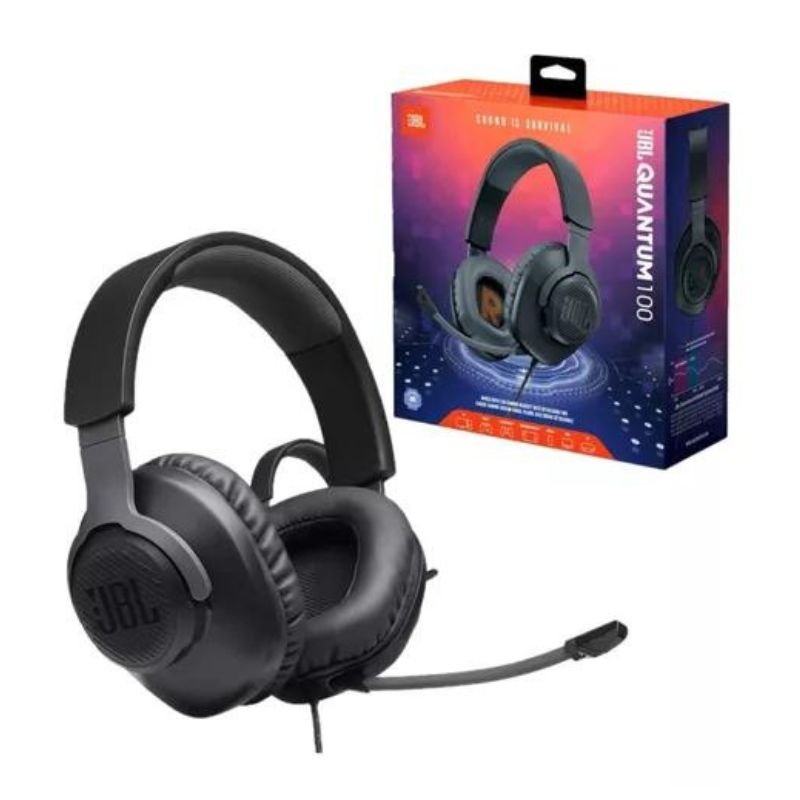
JBL QUANTUM 350 WIRELESS HEADSET – BLACK
SKU: 020206000143
غير متوفر في المخزون
The JBL Quantum 350 Wireless Headset in sleek black delivers a high-fidelity audio experience tailored for gamers. With its wireless freedom, gamers can immerse themselves in their favorite games without being tethered to their device. Featuring JBL QuantumSOUND Signature, it offers precise and immersive audio, while the detachable boom microphone ensures crystal-clear communication with teammates. Its lightweight design and memory foam ear cushions provide comfort for extended gaming sessions. Compatible with multiple platforms, including PC, Mac, Xbox, PlayStation, Nintendo Switch, and mobile devices, the JBL Quantum 350 Wireless Headset is a versatile choice for gamers seeking premium sound quality and freedom of movement.
غير متوفر في المخزون
1. **Unboxing**:
– Open the package carefully and remove all contents.
– Ensure that all the components are included: the headset, detachable microphone, USB wireless dongle, charging cable, and any documentation.
2. **Charging**:
– Connect the provided charging cable to the headset’s charging port.
– Plug the other end of the cable into a power source, such as a USB port on your computer or a wall adapter.
– Let the headset charge until the battery is fully charged. This usually takes a few hours.
3. **Turning On**:
– Press and hold the power button on the headset until you see the LED indicator light up.
– Once the headset is powered on, you may hear a startup sound indicating that it’s ready for pairing.
4. **Pairing**:
– Insert the USB wireless dongle into an available USB port on your device (PC, console, etc.).
– The headset should automatically pair with the dongle. If not, press and hold the pairing button on the dongle until it starts flashing.
– The headset and dongle will connect, and you’ll hear a confirmation sound in the headset.
5. **Adjusting Settings**:
– Use the volume wheel on the ear cup to adjust the volume to your preference.
– If needed, adjust the microphone volume or mute/unmute it using the controls on the headset or detachable microphone.
6. **Wearing Comfort**:
– Adjust the headband and ear cups for a comfortable fit. The headband should sit securely on your head without feeling too tight, and the ear cups should fully cover your ears without causing discomfort.
7. **Gaming**:
– Start your gaming device (PC, console, etc.) and launch your favorite game.
– Put on the headset and adjust the audio settings in the game to optimize your gaming experience.
– Enjoy the immersive sound quality and clear communication with your teammates through the headset’s microphone.
8. **Charging and Storage**:
– When not in use, power off the headset to conserve battery life.
– Store the headset in a safe place, preferably in its original packaging or a protective case, to prevent damage.
– If the battery runs low during use, recharge the headset using the provided charging cable.
Following these steps will help you set up and use the JBL Quantum 350 Wireless Headset for an optimal gaming experience.
ماركة
JBL
Based on 0 reviews
Be the first to review “JBL QUANTUM 350 WIRELESS HEADSET – BLACK”
منتجات ذات صلة
-
سماعات لاسلكية
PS4 890 Gaming HEADSET
“Specification:
Condition: 100% Brand New
Item Type: Gaming Headset
Model: for ps4-890
Material: ABS
Earplug/Earmuff Material: Leather
Optional Color: Black, Blue
Quantity: 1PCS
Plug Diameter: 3.5mm
Sound Production Principle: Moving Coil
Sensitivity: -58(dB)
Loudspeaker Diameter: 40Φmm
Weight: Approx. 220g
Wire Length: Approx. 1.25m/4.10ft”
SKU: PS4 890

لا توجد مراجعات حتى الآن.