
-
×
 ميلوديكا ميلوديكا النحلة Bm 13k
1 × 5.900 OMR
ميلوديكا ميلوديكا النحلة Bm 13k
1 × 5.900 OMR
المجموع: 5.900 OMR
SKU: 20326000129
غير متوفر في المخزون
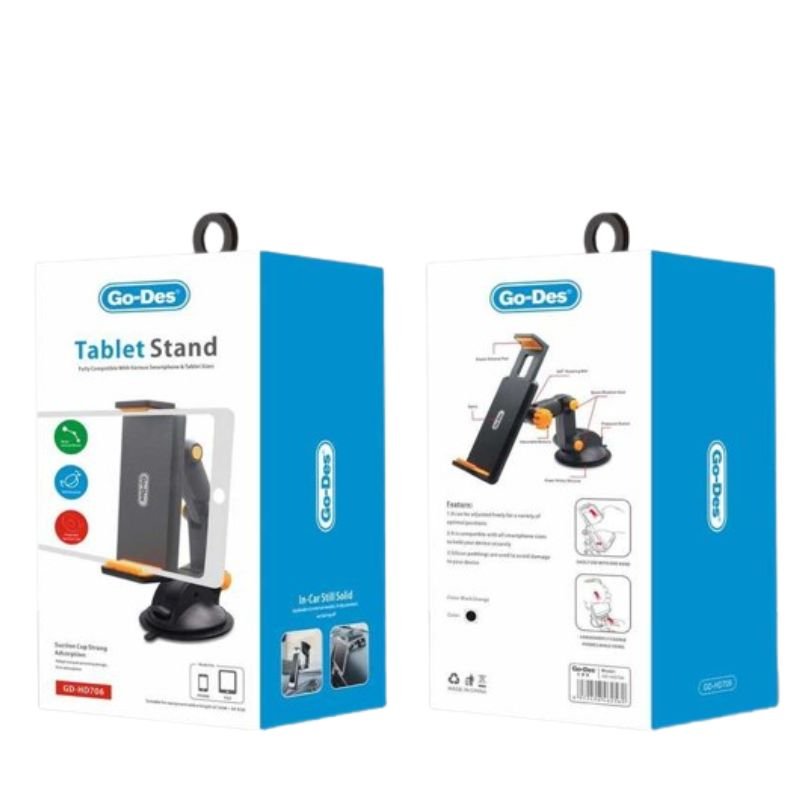
The GO-DES HD706 Tablet Stand offers a versatile and stable solution for hands-free tablet use. With adjustable arms to accommodate various tablet sizes and a flexible viewing angle, it provides optimal comfort for watching videos, reading, or video calling. Its sturdy build ensures secure support, while its sleek design adds a modern touch to any space. Enjoy convenient and ergonomic tablet use with the GO-DES HD706 Tablet Stand.
غير متوفر في المخزون
1. **Unbox and Assemble**: Begin by unboxing the GO-DES HD706 Tablet Stand and identifying its components, including the base, stand, and adjustable arms. Assemble the stand by inserting the stand into the base securely until it clicks into place.
2. **Adjust the Arms**: Depending on the size of your tablet, adjust the arms of the stand to accommodate its width. Loosen the knobs or screws on the sides of the stand and extend or retract the arms to fit your tablet snugly.
3. **Secure Your Tablet**: Once the arms are adjusted, place your tablet horizontally or vertically between the arms of the stand. Ensure that the tablet rests securely on the stand and that the arms provide enough support to hold it in place.
4. **Adjust the Viewing Angle**: Tilt the tablet stand to your desired viewing angle by adjusting the hinge or swivel mechanism located between the base and the stand. Tighten any screws or knobs to lock the stand in place once you’ve found the optimal viewing position.
5. **Enjoy Hands-Free Use**: With your tablet securely mounted on the GO-DES HD706 Tablet Stand and positioned at your preferred angle, you’re all set to enjoy hands-free use. Whether you’re watching videos, reading documents, or video calling, the stand provides stable support for your tablet, enhancing your overall viewing experience.
*Base bottom with protective cushion design, effective anti-skid, make the host more stable.
*The charging design of the two-handles ensures that the handles have enough power at all times.
*Let the host be placed vertically to reduce the waste of space.
*The charging port of the handle designed, and the handle can be lifted and lowered at any time when charging.
*Dual fans are cooled to prevent the host from overheating during the game.
 أقل سعر
 الخدمة والإصلاح

 أحدث
أحدث
لا توجد مراجعات حتى الآن.