
-
×
 PROFESSIONAL STREAMING PLAYER STAND L1
1 × 13.900 OMR
المجموع: 13.900 OMR
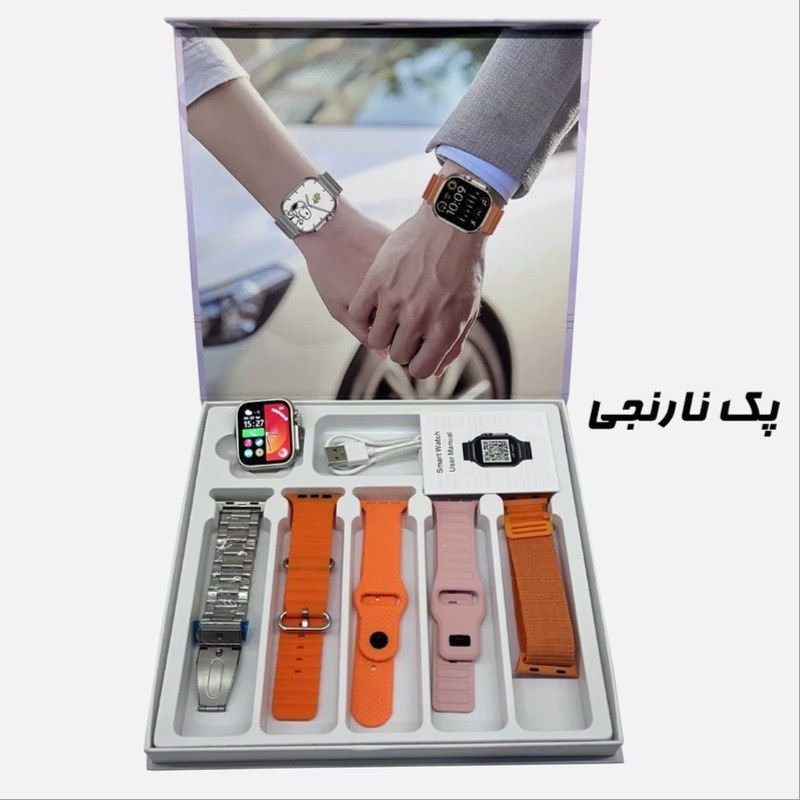
SKU: CPT WS13 ULTRA-2 AMOLED Smart WATCH
غير متوفر في المخزون
The CPT WS13 ULTRA-2 AMOLED Smart Watch is a sleek and advanced wearable device designed to enhance your daily activities. Featuring a vibrant AMOLED display, it offers crisp visuals and vibrant colors. Stay connected with notifications for calls, messages, and social media alerts, all accessible directly from your wrist. Track your fitness goals with built-in activity and heart rate monitoring, helping you stay motivated and healthy. With its stylish design and multifunctional capabilities, the CPT WS13 ULTRA-2 AMOLED Smart Watch is the perfect companion for modern living.
غير متوفر في المخزون
1. **Unboxing and Powering On**:
– Unbox your CPT WS13 ULTRA-2 AMOLED Smart Watch and ensure all components are present.
– Press and hold the power button to turn on the smartwatch. Follow any initial setup instructions displayed on the screen.
2. **Pairing with Smartphone**:
– Navigate to the Bluetooth settings on your smartphone and enable Bluetooth.
– On the CPT WS13 ULTRA-2 Smart Watch, enter the Bluetooth menu and select “Pair a new device.”
– Choose your smartphone from the list of available devices and follow any additional prompts to complete the pairing process.
3. **Customizing Settings**:
– Explore the settings menu on the CPT WS13 ULTRA-2 Smart Watch to customize preferences such as display brightness, sound settings, and notification preferences.
– Adjust settings according to your preferences to optimize your smartwatch experience.
4. **Syncing Notifications**:
– Enable notification access for the CPT WS13 ULTRA-2 Smart Watch on your smartphone to receive notifications directly on your wrist.
– Customize which notifications you want to receive, such as calls, messages, emails, and app alerts, through the companion app or watch settings.
5. **Exploring Features**:
– Familiarize yourself with the various features of the CPT WS13 ULTRA-2 AMOLED Smart Watch, including fitness tracking, heart rate monitoring, weather updates, and music control.
– Take advantage of these features to stay connected, track your health and fitness goals, and enhance your overall smartwatch experience.
 أقل سعر
 الخدمة والإصلاح


 أحدث
لا توجد مراجعات حتى الآن.