
 New Arrivals
 Offers
 Service & Repair


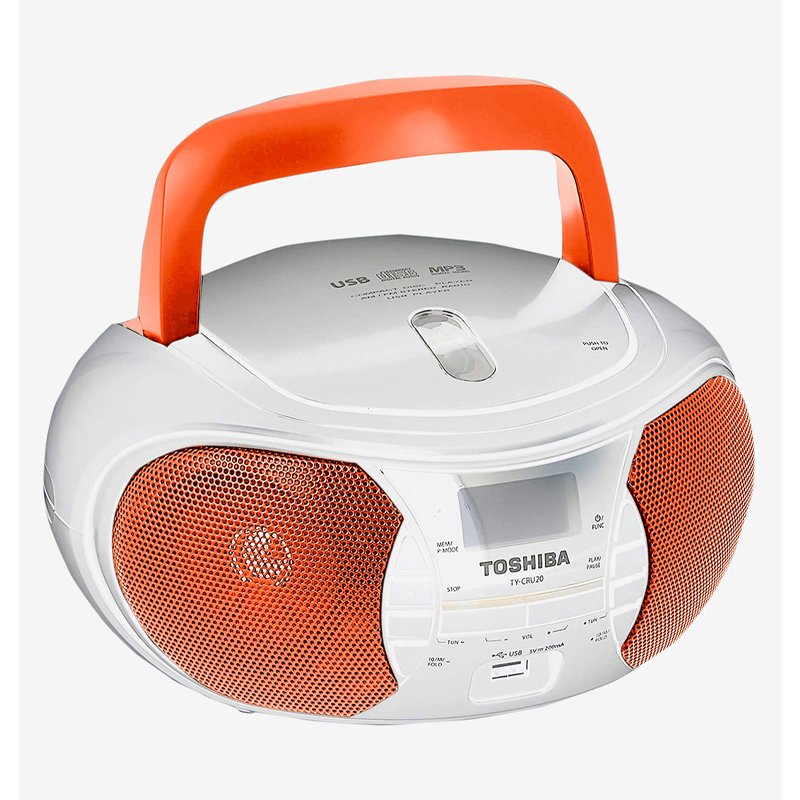
TOSHIBA TY CRU20 Portable CD USB Radio Player – Orange
SKU: TOSHIBA TY CRU20 Radio Orange
Out of stock
Toshiba TY-CRU20 18W Portable CD Radio Player comes with a top loading CD player and a USB slot for MP3 and WMA playback. You can enjoy all your favourite music stored in CDs or USB drives. You can also enjoy the latest hits using the AM/FM stereo tuner. When you want to replay or store your favourite tracks, you can also record the radio broadcasts to your cassette tape.
- LED Backlight LCD Display
- FM / AM Tuner
- 65mm Cone Type Speaker
- Playable Discs: CD, CD-R/RW
Out of stock
1. **Unboxing and Inspection**: Upon receiving the TOSHIBA TY CRU20 Portable CD USB Radio Player in orange, carefully unbox the device and inspect its contents. Ensure all components, including the radio player, power adapter, user manual, and any other accessories, are present and undamaged.
2. **Powering On and Setup**: Plug the power adapter into a suitable power outlet and connect it to the radio player. Turn on the device using the power button or switch. Follow the on-screen prompts or consult the user manual for initial setup instructions, such as setting the time, date, and language preferences.
3. **Playback Options**: The TOSHIBA TY CRU20 offers multiple playback options. Load a CD into the designated tray to enjoy your favorite music or audio content. Alternatively, insert a USB flash drive into the USB port to access digital audio files stored on the drive. Select the desired playback mode (CD or USB) using the mode selector switch or buttons.
4. **Radio Tuning**: Tune in to your favorite radio stations using the built-in FM tuner. Use the tuning knob or buttons to scan through available frequencies and find clear stations. Once tuned in, adjust the volume level to your preference using the volume control knob or buttons.
5. **Portability and Enjoyment**: With its portable design and vibrant orange color, the TOSHIBA TY CRU20 is ideal for on-the-go entertainment. Carry the radio player with you using the built-in handle or place it on a stable surface for stationary listening. Enjoy your favorite music, radio stations, or audio content wherever you are, whether at home, outdoors, or on the move.
These steps should help you set up and enjoy your TOSHIBA TY CRU20 Portable CD USB Radio Player in orange with ease.
There are no reviews yet.