
 New Arrivals
 Offers
 Service & Repair


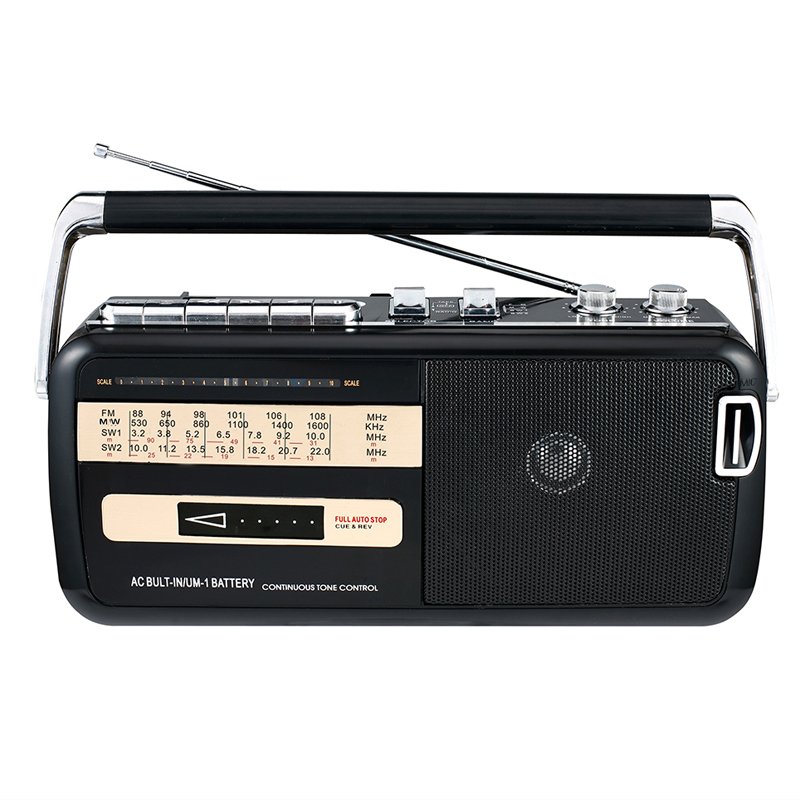
KNSTAR M-50BT FM/MW/SW1/SW2 With USB/SD BT RADIO
SKU: KNSTAR M 50BT RADIO
Out of stock
Style: Home Radio
Brand Name: Knstar
Model Number:M-50BT
Type: AM / FM
Screen: No
Function: Built-In Speaker
Power Supply: Rechargeable Battery Pack
Brand:Knstar
Model Name: M-50BT
Band: FM/AM/SW1-2
Cassette recorder: Yes
Earphone Jack: Yes
AC: 220V/50HZ – 110V/60HZ
DC: 6V(UM-1X4PCS)
IC: DSP radio IC
Product size: 27.5*11*17cm
1. **Power On**: Begin by powering on the KNSTAR M-50BT FM/MW/SW1/SW2 with USB/SD BT Radio using the power button. Usually, the power button is located on the front or top of the radio. Press the button to turn on the device.
2. **Band Selection**: Use the band selector switch or buttons to choose the desired radio band. The KNSTAR M-50BT supports FM (Frequency Modulation), MW (Medium Wave), SW1 (Shortwave 1), and SW2 (Shortwave 2) bands. Select the band you wish to listen to by adjusting the band selector.
3. **Tuning**: Utilize the tuning dial or buttons to scan through available frequencies within the selected radio band. Adjust the frequency tuning until you find clear reception of your desired radio station. Rotate the tuning dial slowly for precise tuning.
4. **USB/SD Playback**: To play audio files from a USB flash drive or SD card, insert the storage device into the corresponding slot on the KNSTAR M-50BT. The radio will automatically detect the USB drive or SD card and start playback. Use the control buttons or dial to navigate through the stored files and select the desired track for playback.
5. **Bluetooth Connectivity**: Activate Bluetooth mode on your smartphone or other compatible device. Then, pair your device with the radio by selecting “KNSTAR M-50BT” from the list of available Bluetooth devices. Once paired, you can wirelessly stream music from your device to the radio.
Following these steps will help you set up and enjoy the KNSTAR M-50BT FM/MW/SW1/SW2 with USB/SD BT Radio, providing you with versatile entertainment options and reliable radio reception.
Brand
KNSTAR
Based on 0 reviews
Be the first to review “KNSTAR M-50BT FM/MW/SW1/SW2 With USB/SD BT RADIO”
Related products
-
Electronics, Music
Bm 13k Bee Melodica
– About item:
* Easy to learn modern wind instrument for young and old to make their own music.
* It is also exceedingly useful in musical education as an introduction to all keyboard instruments.
* Ideal for anyone interested in learning the melodica, tSKU: BM 13K BEE MELODICA


There are no reviews yet.